A signature says "we agree". An approval says "we are allowed to agree, and we checked". The two are easy to blur, especially in small teams where the person who negotiates a deal is also the one who signs it. As a company grows, that blur becomes a risk: contracts go out with unapproved discounts, unusual liability terms or data-sharing clauses nobody in legal has seen.
An internal approval workflow puts the right reviewers in front of a contract before it reaches the other party, without forcing every routine document through a committee. This article explains how to design one: who should approve what, how to set thresholds, why approval must stay separate from signing, and how to keep a record that holds up when someone later asks who agreed to a clause.
Approval and signature answer different questions
It helps to name the two steps precisely.
- Approval is internal. It answers whether the company should enter into this contract on these terms. Approvers may never sign anything visible to the other party.
- Signature is external. It expresses the company's agreement to the counterparty and creates the binding commitment, provided the signer has authority. Our sibling article on who can sign for a company covers that authority question.
Keeping these steps distinct lets you involve legal, finance or security reviewers without making them signatories, and lets an authorised signatory rely on the fact that the specialists have already done their checks.
Who should approve what
Start with the questions each reviewer is responsible for, not with job titles. A typical split looks like this:
| Reviewer | Question they answer | Typical triggers |
|---|---|---|
| Business owner or line manager | Does this deal make sense for the team and budget? | Every contract the team originates |
| Legal | Are the terms acceptable and enforceable? | Changes to standard clauses, liability, governing law, exclusivity |
| Finance | Can we afford it, and are payment terms acceptable? | Value above a threshold, discounts, long payment terms, multi-year commitments |
| Security or privacy | Does the contract involve personal data or system access? | Data processing, integrations, access to company systems |
Not every contract needs every reviewer. The design goal is to route each contract to the smallest set of approvers who can answer the questions that contract actually raises.
Thresholds decide the route
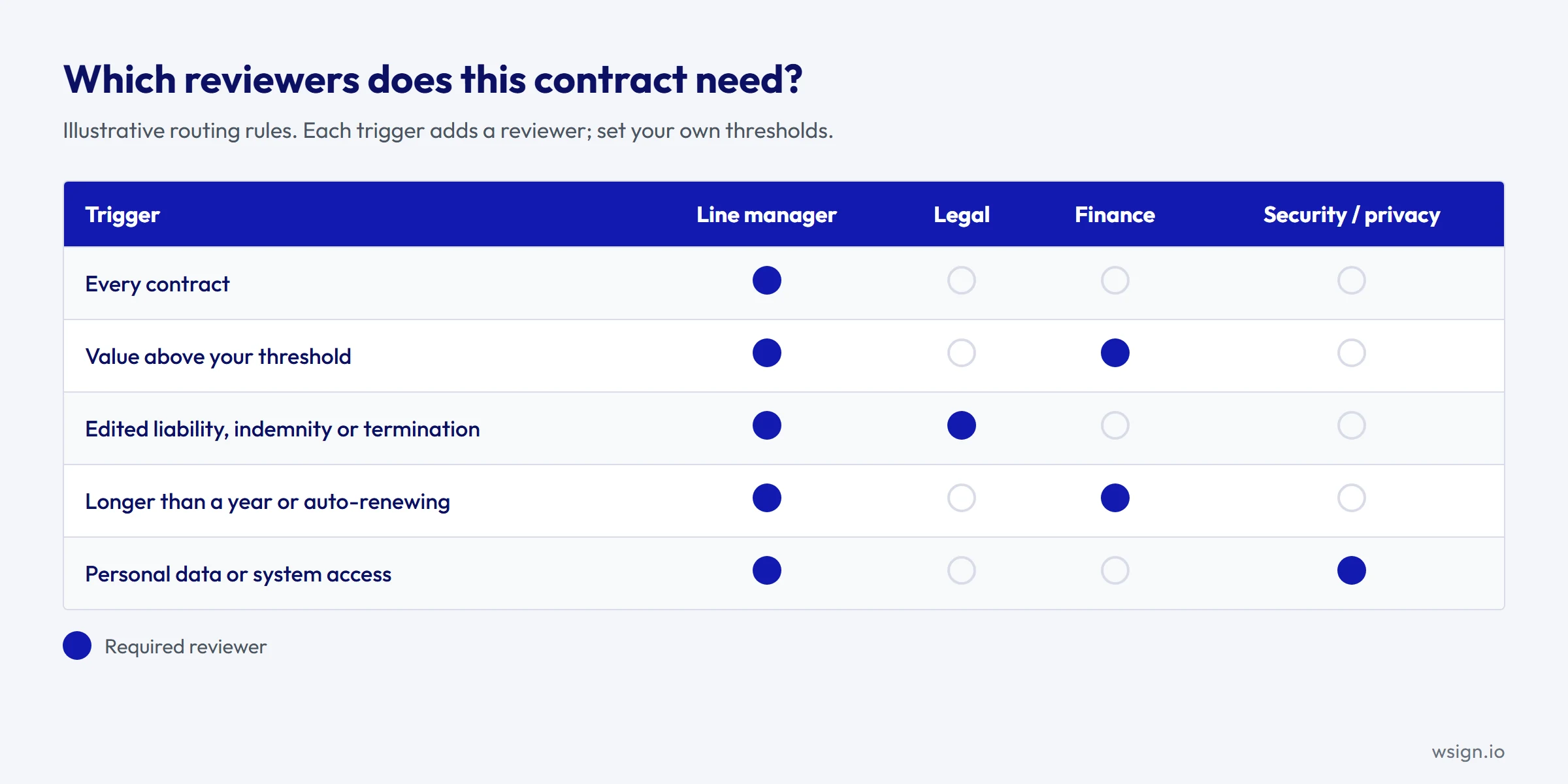
Thresholds turn the table above into rules that anyone can apply. Write them down and keep them short. The figures below are purely illustrative; set your own based on your company's size and risk appetite.
- Value: for example, contracts under a set amount need only the line manager; above it, finance joins; well above it, a director approves as well.
- Deviation from your standard wording: any change to liability, indemnity or termination clauses sends the contract to legal, regardless of value.
- Duration: commitments longer than one year, or with automatic renewal, add finance review.
- Data and access: anything that shares personal data or grants system access adds the security or privacy reviewer.
The strongest signal is often deviation, not value. A small contract with an unlimited liability clause can do more damage than a large one on your standard terms.
Sequential or parallel approvals
Once you know who approves, decide the order.
Parallel
Legal, finance and security review at the same time. This is faster and works well when their questions are independent. The risk is that one reviewer asks for changes after the others have approved, which forces a second round.
Sequential
Reviewers act one after another, usually from the most likely to request changes to the least. Legal often goes first because wording changes affect everyone else's review. Sequential routing is slower but reduces rework.
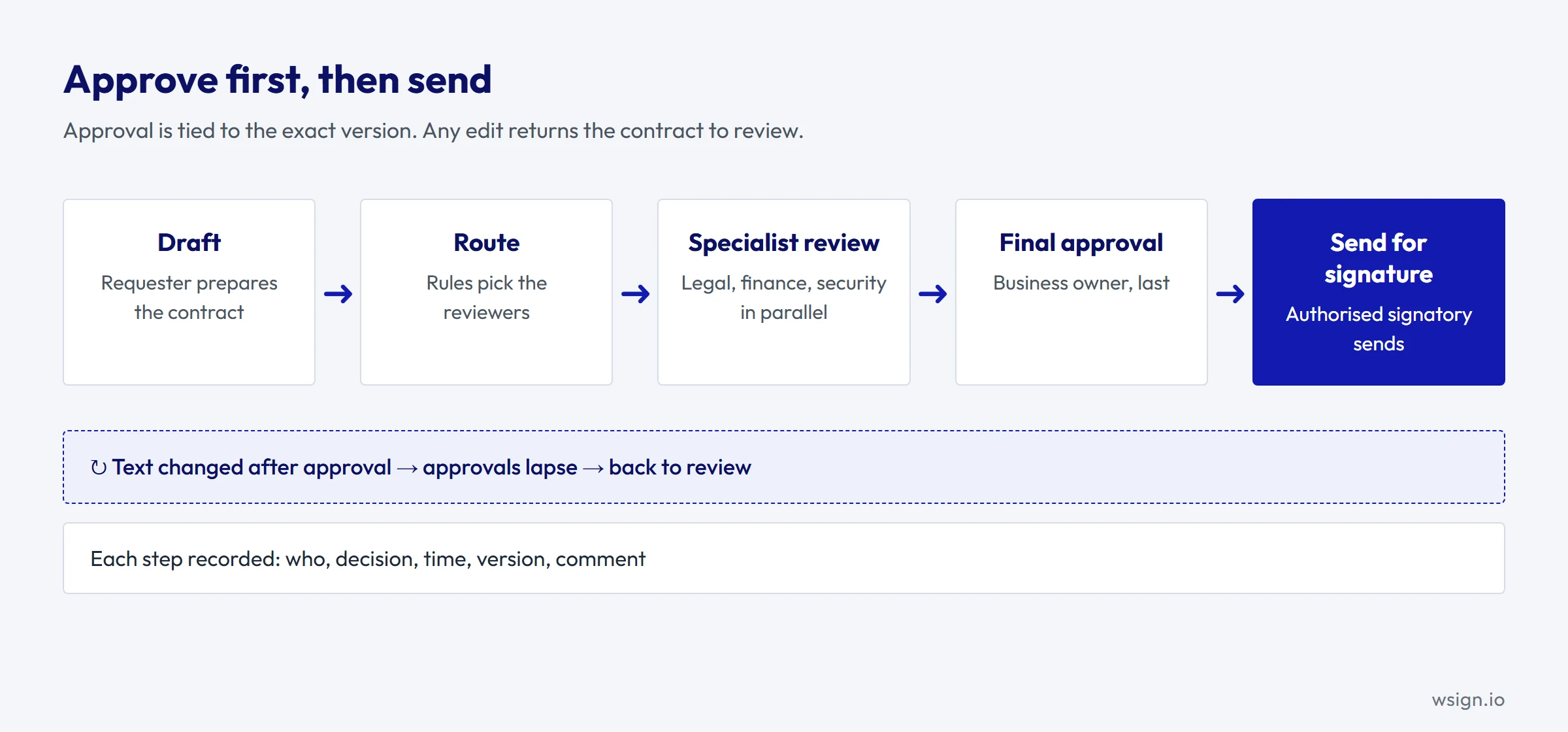
A practical compromise is to run specialist reviewers in parallel and put the final business approver last, after all wording changes have settled.
Keep approval separate from signing
Separation of duties is a long-standing control principle. NIST describes it as the principle that no user should be given enough privileges to misuse a system on their own (NIST glossary, citing SP 800-192). Applied to contracts, it means the person who negotiated a deal should not be the only person who approves it, and an approval should not be something the requester can grant to themselves.
In practice:
- The requester cannot approve their own request, even if they hold the approver role for other teams.
- Approvers review the exact document that will be sent, not a summary of it.
- The signatory sends or signs only after the required approvals exist.
Tie each approval to an exact version
The most common weakness in approval processes is approving one draft and sending another. A reviewer approves version 3 on Monday; the salesperson accepts one more change from the client on Tuesday and sends version 4. The approval record now describes a document that was never sent.
Prevent this by treating any change to the text after approval as cancelling the approval. A well-designed review step records which version was approved and asks for a fresh approval if the content changes. The same idea underlies document fingerprints: if the text changes, the fingerprint changes. See document hashes and integrity for the underlying mechanism.
Handling rejections, absences and delays
Workflows fail at their edges, so design those edges explicitly.
- Rejection with a reason: a rejected request should carry a written reason so the requester knows what to fix. A bare "no" leads to the same document coming back unchanged.
- Delegation: when an approver is away, a named deputy should be able to act. Decide in advance who that is; do not let requests wait for someone on leave.
- Escalation: set a time after which an unanswered request goes to the approver's manager. This keeps deals moving without removing the control.
- Urgent exceptions: if your business sometimes needs to sign the same day, define a documented fast route, such as a single senior approver, rather than letting people bypass the workflow informally.
Record the approvals, not just the signature
When a dispute arises months later, the question is often not "who signed?" but "who knew about this clause and agreed to it?". A useful approval record shows, for each step, the approver, the decision, the time, the version reviewed and any comment. Store that record next to the signed document and its audit trail, so that one place answers both internal and external questions.
A worked example
Imagine a software company whose sales team sends subscription agreements. Its rules say that a manager approves every agreement; finance joins above an agreed annual value or when payment terms exceed sixty days; legal joins whenever the liability clause is edited; and the privacy lead joins when the client wants to send personal data into the product.
A salesperson prepares an agreement within the value limit but with a client-requested change to the liability cap. The workflow routes it to the manager and legal. Legal narrows the change and approves; the manager approves last. The client then asks for one more wording change. Because the text changed, the earlier approvals lapse and the agreement returns to legal. Once re-approved, the authorised signatory sends it for signature, and the evidence file for the signed contract sits alongside the approval history.
Getting started without over-engineering
Begin with two rules: every contract has one approver who is not the requester, and any deviation from standard wording goes to legal. Run that for a few weeks, note where requests stall, and add thresholds only where you see real risk. A workflow that people trust and actually use beats a perfect one they route around. When you are ready to put it in place, the review workflow page explains how approvals fit before sending in wsign.
Frequently asked questions
Does the approver need to sign the contract?
No. Approval is an internal decision. The external signature comes from someone with authority to bind the company, who may or may not be one of the approvers.
What happens if the client requests changes after approval?
Treat the changed document as new. The earlier approval covered a different text, so the contract should go back to the reviewers whose questions the change affects.
How many approval steps are too many?
If routine, standard-terms contracts regularly wait days for approval, the route is too heavy. Reserve extra reviewers for contracts that trigger their specific questions.
Can a manager approve their own team's request?
Yes, as long as the manager is not also the person who prepared it. The rule that matters is that nobody approves their own request.
If you want approvals and signatures in one place, you can create a wsign account and set up a review step before contracts go out.