When a PDF viewer shows a green tick next to a signature, it is reporting the end of a long check that most people never see. The software has looked at a certificate, followed it up a chain of issuers to a root it already trusts, and asked whether anyone withdrew that certificate before the signature was made. If any link in that sequence fails, the tick turns into a warning.
This article walks through that sequence in plain terms: what an X.509 certificate binds together, how a chain of trust is built and checked, how revocation works through CRLs and OCSP, and why "expired" and "revoked" lead to very different conclusions about a signed contract. It ends with what a signer's token certificate actually proves, and what it leaves open.
The technical rules come from two IETF documents: RFC 5280, the internet profile for X.509 certificates and certificate revocation lists, and RFC 6960, which defines the Online Certificate Status Protocol.
What a certificate binds together
A certificate is a signed statement from an issuer. It says, in effect: "this public key belongs to this subject, for this period, for these purposes." The issuer, a certification authority (CA), signs that statement with its own private key, so anyone holding the issuer's public key can confirm the statement was not altered.
Four fields matter most when you are judging a signature:
- Subject — the person or organisation the key is attributed to. For a personal signing certificate this usually holds a name and sometimes an identifier, depending on the issuer's policy.
- Issuer — the CA that vouches for the binding. This is the field a validator uses to find the next certificate up the chain.
- Validity period — RFC 5280 (section 4.1.2.5) defines it as the time from notBefore through notAfter, inclusive. Outside that window the issuer no longer stands behind the binding.
- Key usage — what the key may be used for. RFC 5280 (section 4.2.1.3) describes a digitalSignature bit and a bit originally named nonRepudiation, which later X.509 editions renamed contentCommitment; the latter is meant for signatures that protect against a signer falsely denying an action.
Notice what is absent. A certificate does not describe a document, a contract amount, or the signer's intent. It describes a key. Everything else has to come from the signature itself and the evidence around it.
The chain of trust, link by link
Your computer or PDF reader does not know every CA in the world. It ships with a small set of trusted roots, called trust anchors. RFC 5280 explains (section 3.2) that certification paths exist precisely because a user starts with only a limited number of assured CA public keys. Every other certificate has to be connected to one of those anchors.
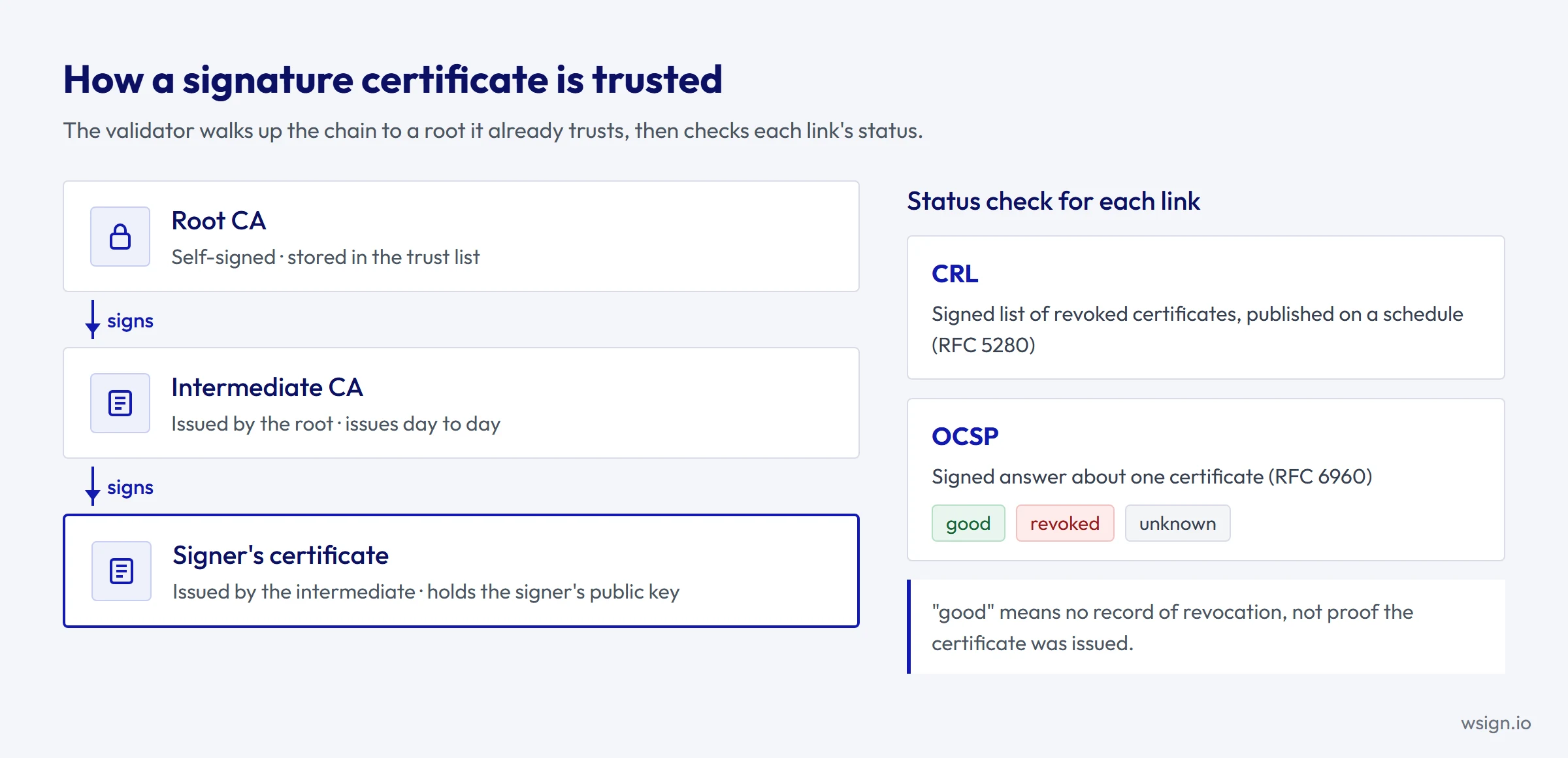
A typical chain has three links:
- Root CA certificate — self-signed and installed in the trust store. It is kept offline in most well-run hierarchies and signs very little.
- Intermediate (issuing) CA certificate — signed by the root. It does the day-to-day issuing, so a compromise here can be contained without replacing the root everywhere.
- End-entity certificate — the signer's own certificate, signed by the intermediate.
RFC 5280's path validation (section 6.1) checks, among other things, that the subject of each certificate is the issuer of the next one, that the first certificate was issued by the trust anchor, and that every certificate was valid at the time in question. Each signature along the path is verified with the public key from the certificate above it.
Where chains usually break
In practice, most validation failures are mundane. The signer's software did not embed the intermediate certificate, so the reader cannot build the path. The recipient's trust store does not contain the root, which is common when a national or sector-specific CA is not in a default list. Or a certificate in the path has expired. None of these mean the signature was forged; they mean the validator could not reach a conclusion. A "signature validity unknown" message deserves investigation, not panic.
Revocation: withdrawing a certificate early
Certificates are issued for months or years, but things change within that time. A token is lost, an employee leaves, a private key is suspected of being copied. The CA then revokes the certificate, and relying parties need a way to learn about it. There are two standard channels.
Certificate revocation lists (CRLs)
RFC 5280 (section 3.3) describes a CRL as a time-stamped list identifying revoked certificates, signed by the CA or a CRL issuer and published in a public repository, typically on a regular schedule such as hourly, daily, or weekly. Each CRL carries a nextUpdate field, which conforming issuers must include (section 5.1.2.5), telling validators when a fresher list is due.
Entries can carry a reason code (section 5.3.1): for example keyCompromise, affiliationChanged, superseded, cessationOfOperation, or certificateHold. An entry can also carry an invalidity date (section 5.3.2): the date on which the private key is known or suspected to have been compromised, which may be earlier than the date the revocation was recorded. That detail matters for signatures made in the gap between the two dates.
A revoked certificate stays on the CRL at least until it appears on one regularly scheduled CRL issued after the certificate's validity period ends (section 3.3). After that, the list can drop it, which is one reason long-term archives keep their own copy of the revocation data that applied at signing time.
OCSP: asking about one certificate
Instead of downloading a whole list, a client can ask an OCSP responder about a single certificate and receive a signed answer. RFC 6960 (section 2.2) defines three answers:
- good — the responder has no record of revocation for that certificate within its validity interval. RFC 6960 is careful to note that this does not, by itself, prove the certificate was ever issued.
- revoked — revoked temporarily (on hold) or permanently.
- unknown — the responder does not know about the certificate, often because it does not serve that issuer; the client may try another source such as a CRL.
OCSP responses carry thisUpdate and, optionally, nextUpdate; RFC 6960 says a response whose nextUpdate is earlier than the local time should be treated as unreliable. A client can also add a nonce so the responder's answer is bound to that request and cannot be replayed (section 4.4.1).
| Question | CRL | OCSP |
|---|---|---|
| What the validator fetches | A signed list of every revoked certificate from that issuer | A signed answer about one certificate |
| Freshness signal | thisUpdate and nextUpdate on the list | thisUpdate, optional nextUpdate, and producedAt on the response |
| Works offline later? | Yes, if the list is saved with the signature | Yes, if the signed response is saved with the signature |
| Typical weakness | Lists can grow large and are only as current as the last publication | Depends on the responder being reachable at check time |
Expired versus revoked: why the difference matters
Both an expired and a revoked certificate will fail a check performed today. But for a contract signed in the past, the two states mean very different things.
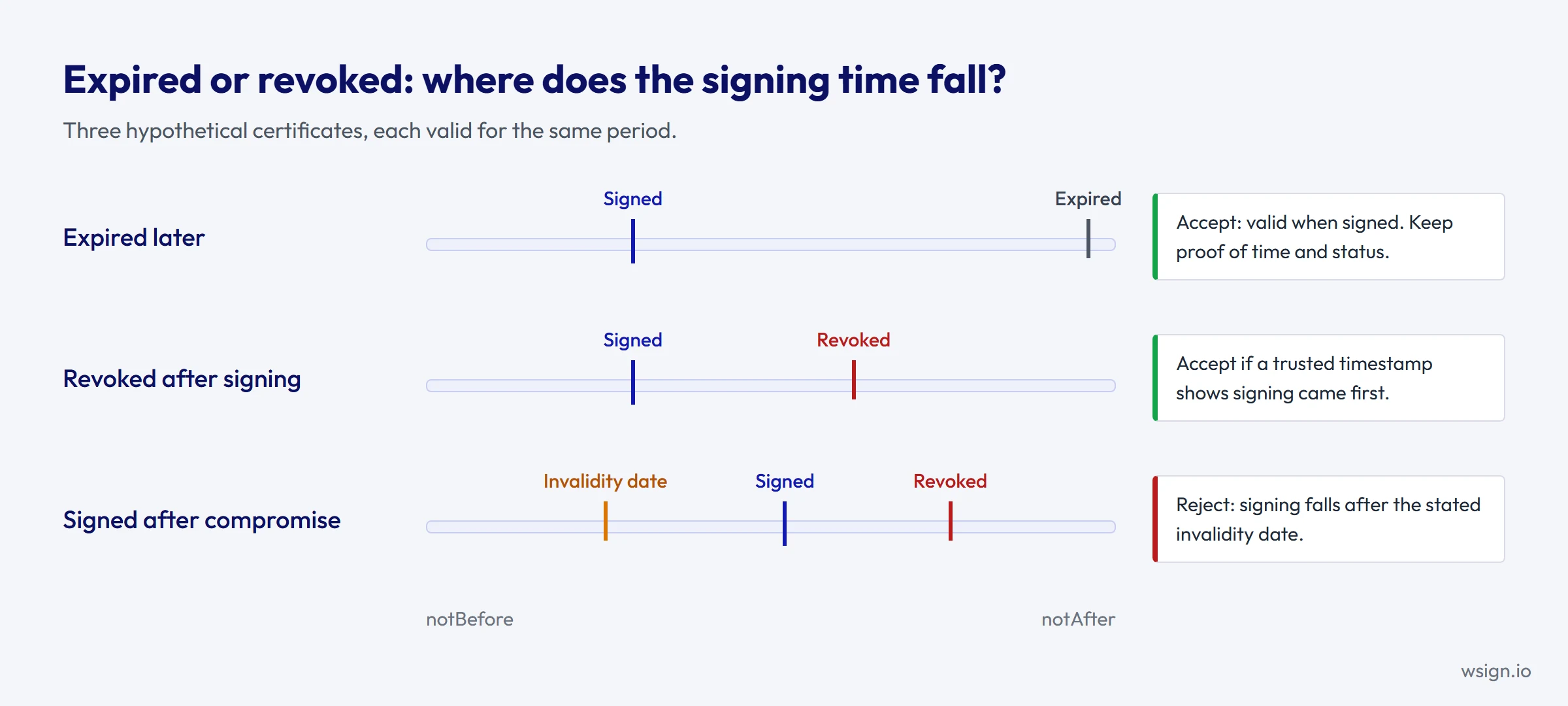
Expiry is the planned end of the validity period. A signature made while the certificate was valid does not become false when the certificate later expires. The problem is practical: once the certificate has expired, the CA may no longer publish status information for it, and a validator checking "now" cannot confirm it was good at the time of signing.
Revocation is an early withdrawal. If the signature was made before the revocation, and before any invalidity date given for a key compromise, it can still be accepted. If it was made after, it should not be.
Both cases depend on one thing: reliable proof of when the signature was made. A clock on the signer's laptop proves little. A trusted timestamp does more. RFC 3161 describes a time-stamp token as evidence that a datum existed before a particular time, and its Appendix B uses exactly this scenario: showing that a signature predates a certificate's revocation. We explain how archives keep that evidence usable for years in our guide to PAdES long-term validation.
What a signer's token certificate proves, and what it does not
When someone signs with a certificate stored on a hardware token issued by a licensed certification provider, a valid chain and a good status let you conclude several things:
- The signature was produced with the private key that matches the certificate's public key.
- A CA, following its published policy, attributed that key to the subject named in the certificate.
- If a trusted timestamp is attached and the status data covers that time, the certificate had not been revoked when the signature was made.
- The signed bytes have not changed since signing, because any change breaks the signature.
It does not, on its own, tell you that the signer had authority to bind a company, that they read every page, or that the document was the version both sides negotiated. Those questions are answered by the surrounding process: who sent the document, how the signer was invited and verified, and what the audit trail records. That is also why a certificate signature and a simple electronic signature are not interchangeable; our article on electronic versus digital signatures covers the distinction.
In wsign, signing with a certificate token is one of several signing paths. The resulting record sits next to the document's SHA-256 fingerprint, a trusted timestamp, and the audit trail in the document's evidence file, and anyone holding the verification number can check the document on the public verification page.
A five-point check for recipients
- Open the signature panel and read the subject name, not only the tick colour.
- Look at the full chain. Does it end at a root you would expect for that signer's country or sector?
- Check the signing time and whether it comes from a trusted timestamp or the signer's own clock.
- Look for embedded revocation data (a CRL or OCSP response) from around the signing time.
- If the reader shows "unknown", find out which link is missing before you reject or accept the document.
Frequently asked questions
Is a self-signed certificate ever acceptable for signing contracts?
Technically it produces a valid signature, but nobody outside the signer has vouched for the name in it, so a relying party has nothing to anchor trust to. Unless both sides have exchanged and pinned that certificate in advance, treat it as an unverified identity claim.
Why does my PDF reader say "validity unknown" for a signature I know is genuine?
Usually the reader cannot build the chain: the root is not in its trust list, an intermediate is missing, or it could not reach a CRL or OCSP service. Adding the issuer's root to the trust list, after confirming it through an official channel, often resolves it.
Does OCSP "good" mean the certificate is definitely legitimate?
Not on its own. RFC 6960 notes that "good" means the responder has no record of revocation; it does not prove the certificate was issued. Chain validation and the responder's own authority still need to be checked.
Should I re-sign every contract when the signer's certificate expires?
No. A signature made while the certificate was valid remains a record of that moment. What you need is preserved proof of the signing time and of the certificate's status at that time, kept with the document.
If you want to see how a signed document's fingerprint, timestamp and audit trail fit together, you can create a wsign account and send a test document to yourself.