Imagine opening a signed lease ten years from now because a dispute has finally reached a tribunal. The PDF still opens. The signature panel, however, now says the signer's certificate expired years ago, the issuer's revocation server no longer answers, and the hash algorithm used at the time is considered weaker than it was. Nothing about the document changed, yet the software can no longer confirm what it confirmed on the day of signing.
That gap between "the signature was fine" and "we can still prove the signature was fine" is what long-term validation (LTV) is meant to close. In PDF documents, the European standard that defines how is PAdES, and its baseline profile sets out four levels: B-B, B-T, B-LT and B-LTA.
This guide explains what each level adds, where the validation data physically sits inside the PDF, and how to run an archive so that signatures you receive today can still be checked when the people who made them have changed jobs, tokens and email addresses.
Why a valid signature can stop verifying
A digital signature is checked against outside facts: the signer's certificate, the chain of certification authorities above it, and the revocation status of each certificate at signing time. All of those facts have a shelf life.
- Certificates expire. Once a certificate passes its end date, its issuer may stop publishing status for it.
- Revocation data moves on. Under RFC 5280 (section 3.3), a revoked certificate need only stay on the revocation list until one scheduled list has been issued after the certificate's validity period ends.
- Services close. OCSP responders and CRL addresses embedded in old certificates can disappear when a provider restructures.
- Cryptography ages. Algorithms and key sizes that are acceptable today may be considered too weak in the future.
The PAdES standard names these risks directly. ETSI EN 319 142-1 V1.2.1 notes that its two higher levels are appropriate where the technical validity of a signature must be preserved after creation and "certificate expiration, revocation and/or algorithm obsolescence is of concern."
PAdES and its four baseline levels
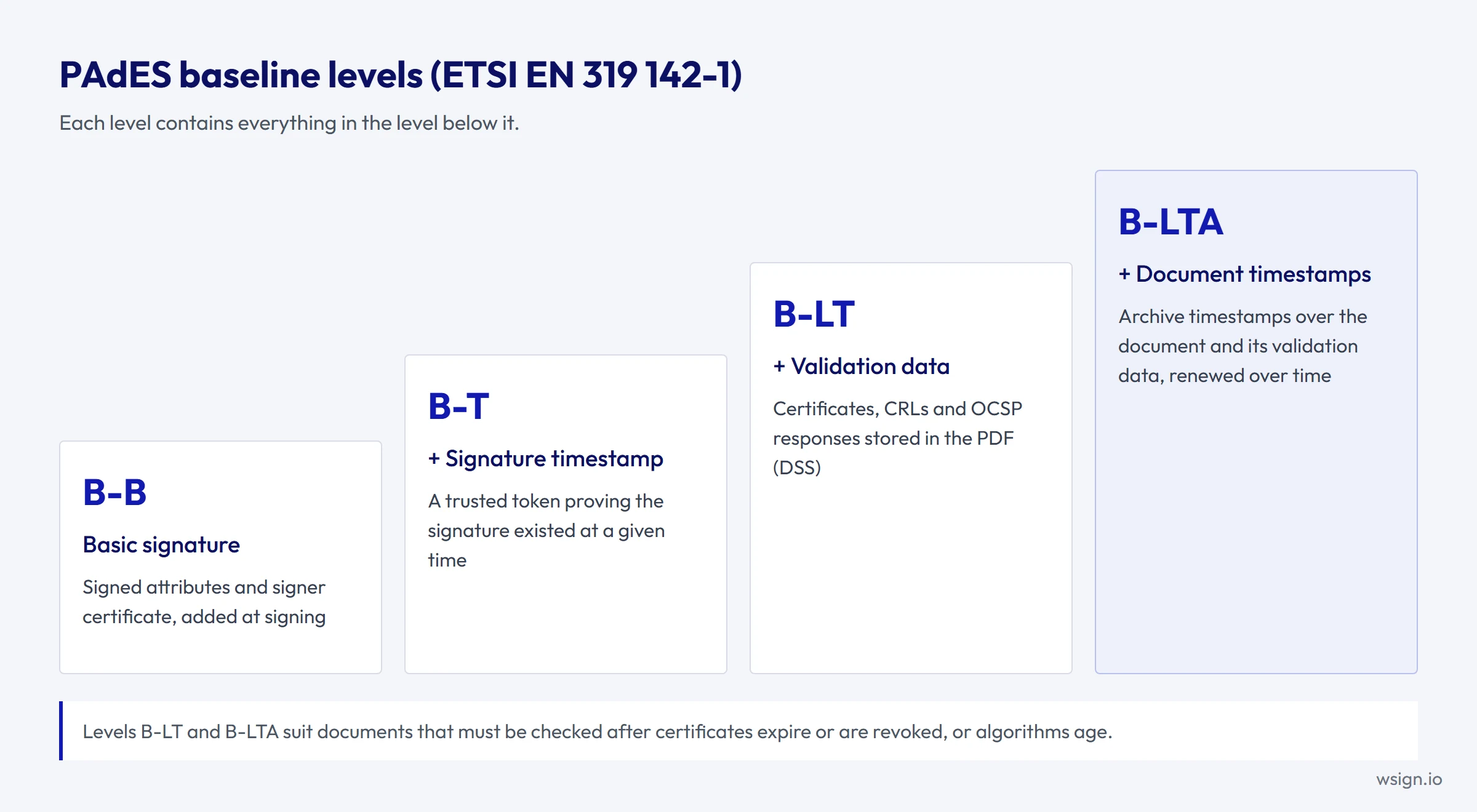
PAdES stands for PDF Advanced Electronic Signatures. ETSI EN 319 142-1 covers the formats, building blocks and the baseline profile; the procedures for creating, augmenting and validating signatures are in a separate standard, ETSI EN 319 102-1, which EN 319 142-1 refers to. Clause 6.1 of EN 319 142-1 defines four levels intended "to encompass the life cycle" of a PAdES signature. Each level includes everything in the one below it.
| Level | What it adds (per EN 319 142-1, clause 6.1) | Risk it addresses |
|---|---|---|
| B-B | Signed attributes, and some unsigned ones, incorporated when the signature is generated | Integrity and signer binding at the moment of signing |
| B-T | A trusted token proving the signature existed at a certain date and time | Disputes over when the signature was made |
| B-LT | All the material required to validate the signature, inside the signed document | Long-term availability of certificates and revocation data |
| B-LTA | Electronic time-stamps that allow validation long after the signature was generated | Long-term availability and integrity of that validation material |
The standard also says that when signed data is exchanged, the sender should use at least a level that allows the relying party to trust the signature at the time of the exchange. In other words, B-B can be enough for a short-lived internal approval, while a document that must survive years in a file room needs more.
Where the validation data lives inside the PDF
EN 319 142-1 extends the PDF format (ISO 32000-1) with two structures that make long-term validation possible without any outside file.
The Document Security Store
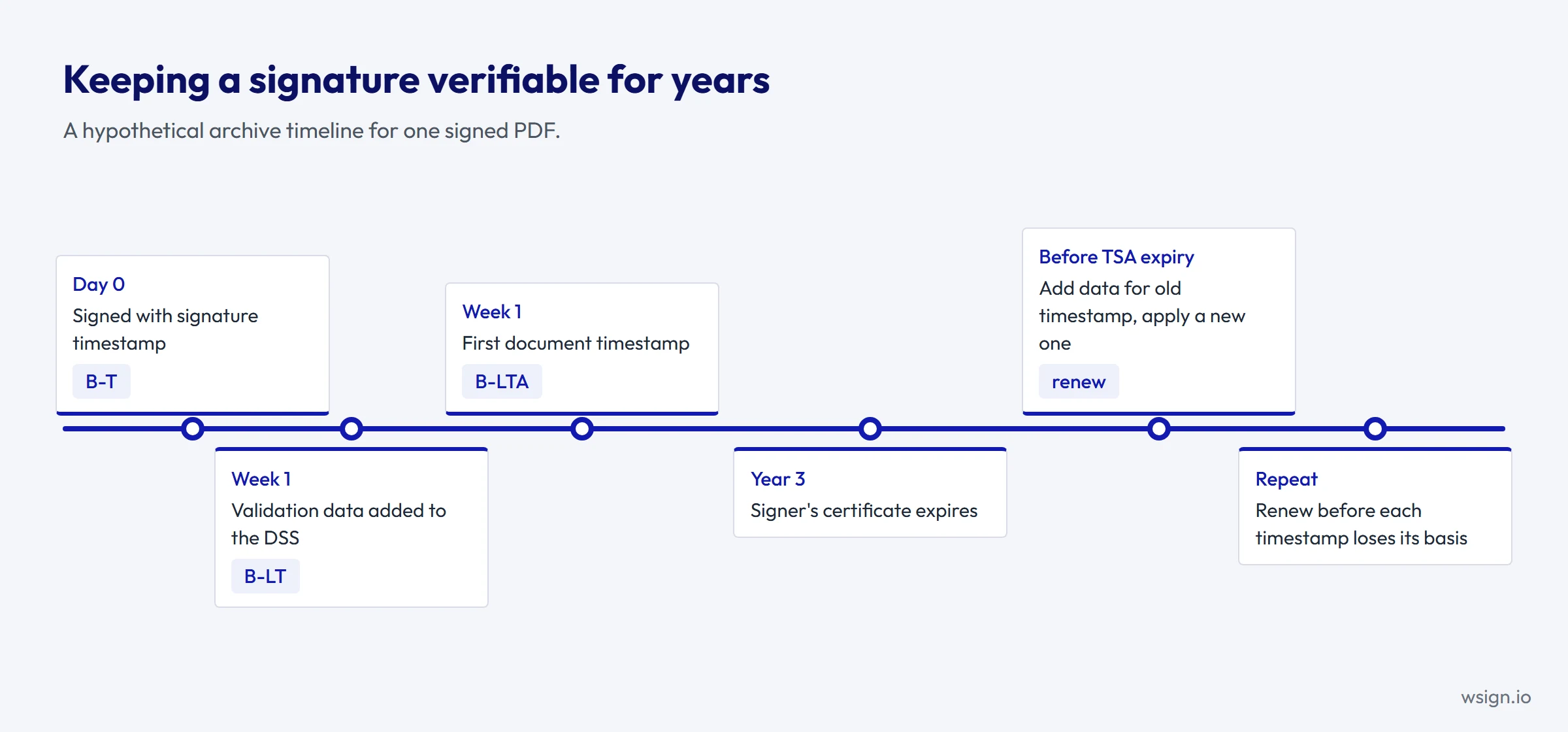
The Document Security Store (DSS) is a dictionary inside the PDF that carries the data needed to validate signatures: certificates, CRLs and OCSP responses. It can be accompanied by Validation Related Information (VRI) entries that tie a set of validation data to one specific signature. When an archive "augments" a B-T signature to B-LT, it is essentially collecting the chain and the revocation answers that applied at signing time and writing them into this store.
The Document Time-stamp
A Document Time-stamp is a special signature dictionary whose content is a time-stamp token over the whole document, including the DSS added before it. It proves that the document, with all its validation data, existed in that exact form at that time. EN 319 142-1 describes how the protection can be extended beyond the life of the last document time-stamp by adding DSS data that validates it and then applying a new document time-stamp. Every time the DSS is updated in this way, it should carry forward the values of the previous one.
These additions are written as incremental updates, appended after the existing signed bytes. The original signature still covers exactly what it covered on the day of signing.
The role of RFC 3161 timestamps
Timestamps appear twice in this design, for two different reasons.
- The signature timestamp (B-T). A time-stamping authority signs a token over a hash of the signature. RFC 3161 describes this as evidence that a datum existed before a particular time; the authority receives only the hash, not the document. This fixes the signing moment so later revocations can be judged against it.
- The document timestamps (B-LTA). Each archival timestamp seals the document plus its stored validation data. Because the time-stamping authority's own certificate will also expire one day, the archive must later add validation data for that timestamp and apply a fresh one, renewing the protection before the previous one becomes unverifiable.
We cover timestamps in general, including how a token is built, in our earlier article on trusted timestamps. For the certificate and revocation mechanics that sit underneath all of this, see how certificate chains and revocation work.
A practical checklist for archives
Standards describe formats. Keeping signatures verifiable is an operational habit. The following steps suit a legal, procurement or HR team that receives signed PDFs and must keep them for years.
- Decide the horizon first. Write down how long each category of signed document must be kept. That number decides whether B-T is enough or whether you need B-LT or B-LTA.
- Validate on arrival. Run a validation report as soon as a signed PDF arrives, and keep the report. A problem found on day one can still be fixed by asking the sender; a problem found in year eight usually cannot.
- Capture validation data early. Augmentation to B-LT depends on fetching revocation information that applied at signing time. The longer you wait, the more likely the responder or list has moved on.
- Keep the original bytes. Store the exact file you received. Printing to PDF, flattening, optimising or re-saving in an editor can produce a new file in which the original signature no longer verifies.
- Diary the renewals. If you rely on B-LTA, record when each document timestamp's certificate expires and plan to apply the next one well before that date.
- Watch algorithm guidance. Assign someone to follow announcements about hash and signature algorithms, so renewals happen before an algorithm is formally retired rather than after.
- Keep the evidence around the signature. The PDF proves the cryptography. The audit trail proves the process: who was invited, how they authenticated, when they opened and signed. Store both together. Our article on electronic contract archiving covers storage and indexing.
- Test a restore. Once a year, pull an old file from the archive and validate it on a clean machine. It is the only real proof the process works.
Questions to ask your e-signature provider
- Which PAdES level do your final signed PDFs reach by default, and can that be raised?
- Do you embed the certificate chain and revocation data, or only reference them?
- Which time-stamping authorities do you use, and is the timestamp applied to every signature?
- Can I export the evidence (audit trail, fingerprints, timestamps) separately from the PDF?
- If I stop using your service, can I still verify the documents I already hold?
In wsign, every signed document carries a SHA-256 fingerprint and a trusted timestamp, and its audit trail and evidence file are kept with it. Recipients can check a document on the public verification page using its verification number, and the trust centre describes how the evidence is produced.
Frequently asked questions
Does B-LTA mean a signature stays valid forever?
No. B-LTA makes long-term validation possible, but only if someone keeps renewing the document timestamps before the previous ones lose their own validation basis. It is a maintenance process, not a permanent seal.
Can an old B-B signature be upgraded later?
The standard defines the B-T level as adding a trusted token "for an existing signature," and augmentation is part of the procedures in ETSI EN 319 102-1. In practice, success depends on whether the certificates and revocation data from the signing period can still be obtained, which is why early augmentation matters.
Is a signature at B-B level invalid?
Not at all. B-B is a complete signature. It simply carries less evidence for the future, so it is better suited to documents that will not need checking years later, or to cases where you will augment it soon after receipt.
Will adding validation data or timestamps break the original signature?
It should not, when done correctly. The additions are appended as incremental updates and the original signature continues to cover its original byte range. Re-saving the whole file in an editor is a different matter and can break it.
To see what a signed document's fingerprint, timestamp and evidence file look like in practice, you can open a wsign account and sign a test PDF.