Nonprofits sign a surprising amount of paper for organisations that rarely have a legal department. One programme can involve a grant agreement with a funder, memoranda of understanding with local partners in two or three countries, volunteer agreements, participant consent forms, and a board resolution approving the whole thing. Each document has a different signer, a different level of risk, and often a different language.
Electronic signing helps most where paper hurts most: board members who live in different cities, field partners with unreliable connectivity, and volunteers who join on a weekend and never visit the office. Moving these documents online, however, is more than sending a link. The way you collect each signature should match what the document is for and who will have to rely on it later.
This guide walks through the documents a typical nonprofit signs, how to set up each one, and how to make signing work for people on slow mobile connections.
Map your documents before you choose a method
Start with an inventory rather than a tool. List every document your organisation asks someone to sign in a year, then ask one question about each: if this signature were challenged in two years, what would we need to prove? The answer decides how much verification the signing step deserves.
| Document | Who signs | What you may need to prove later | Reasonable verification |
|---|---|---|---|
| Grant agreement | An authorised officer, then the funder | That the organisation, not just an individual, accepted the conditions | One-time code, a fixed signing order, and the organisation's seal where the funder expects one |
| Partner MoU | The signatory of each organisation | Who agreed, to which version, and when | One-time code; identity verification for a partner you have never worked with |
| Volunteer agreement | The volunteer, plus a guardian for minors | That the volunteer received the code of conduct and the risk notice | One-time code by email or WhatsApp |
| Participant consent form | The participant or a legal representative | Specific, informed consent that you can demonstrate | One-time code; identity verification where the stakes are high |
| Board resolution | Board members | Each member's approval and that a quorum was reached | Parallel signing with reminders; two-step verification on the accounts that send it |
The last column is a starting point, not a rule. A volunteer agreement for a weekend clean-up and one for work with vulnerable children are different documents even if they share a title. For a structured way to match verification to risk, see the guide to one-time code verification and the overview of electronic identity checks.
Grant agreements: signing on behalf of the organisation
A grant agreement binds the nonprofit, so the first question is not "who is available to sign" but "who is allowed to". Your bylaws or a delegation of authority usually answer it. If they are silent, settle it with a board decision before the funding season, not on the afternoon the agreement arrives. The companion article on who can sign for a company covers how to document and check that authority.
Funders often attach annexes: an approved budget, a reporting calendar, branding rules. Put them in the same PDF as the agreement before you send it. When the annexes travel as separate attachments, the signature covers only the main text, and a later dispute about "which budget was approved" becomes harder to settle. With PDF import you upload the combined file and place signature and date fields where they belong.
For example, imagine a small education charity receiving a two-year grant. The programme officer checks the deliverables, finance checks the budget annex, the executive director signs and applies the organisation's digital seal, and the funder countersigns last. Running those checks through an internal review workflow before sending keeps approvals separate from the signature itself, so the signed document carries only the people who bind the organisation.
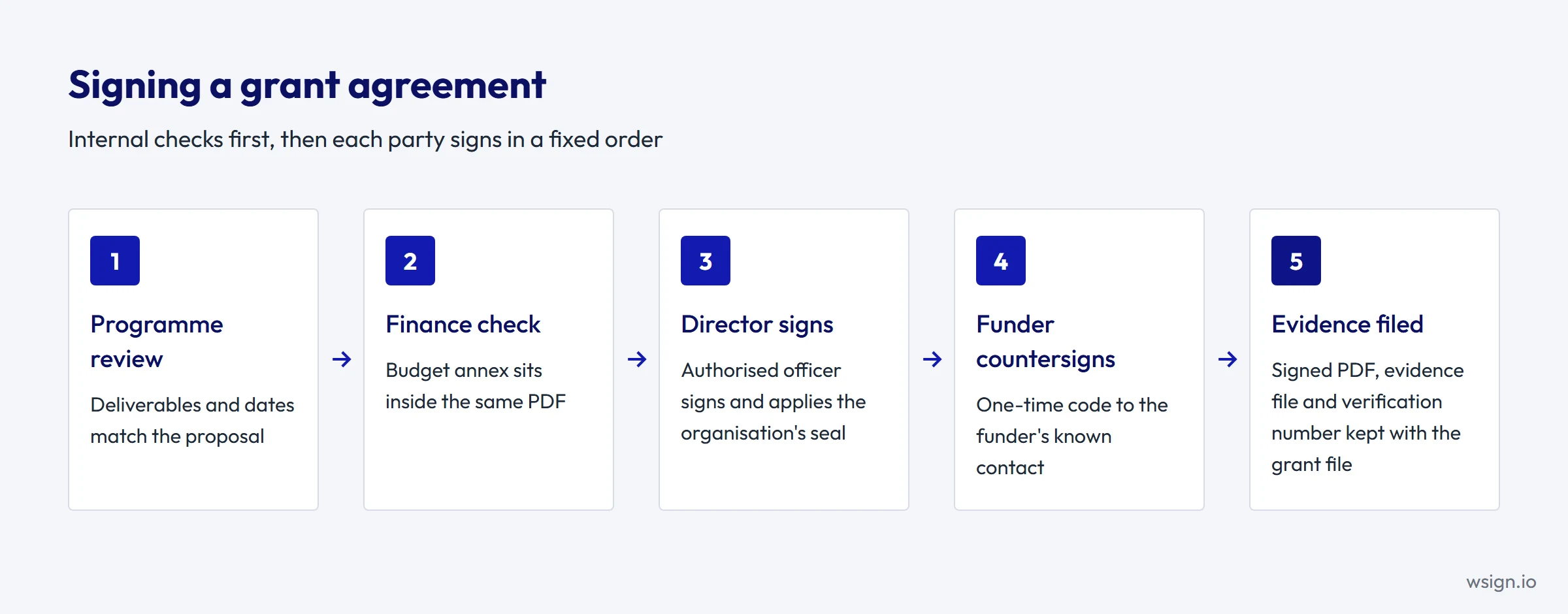
Once everyone has signed, store the evidence file next to the grant file. Auditors and funders tend to ask for proof months later, and the evidence record answers the usual questions in one place: who signed, how each signer was verified, when, and whether the document has changed since.
Partner MoUs across countries
Memoranda with local partners are where nonprofits most often cross borders. Three practical issues come up repeatedly.
- Language. If the MoU exists in two languages, decide which version prevails and say so in the text. Both versions should be inside the signed file, so that each signer approves exactly what the other approved.
- Identity. A partner you have worked with for years can sign with a one-time code sent to an address you already know. A new partner introduced by email is a different case; identity verification of the signer through a specialised provider is a proportionate step before money or data change hands.
- Recognition. Rules on electronic signatures differ by country, and some governments or registries expect specific forms for particular documents. Ask local counsel in the partner's country when the MoU will be filed with an authority or used to open a bank account. The article on e-signatures in the UAE and the Gulf shows how much detail varies even within one region.
Time zones matter more than they seem. If your partner works on a different weekend, a three-day expiry can lapse before anyone opens the email. Set a longer expiry and let automatic reminders do the chasing.
Volunteer agreements and onboarding packs
Volunteers rarely sign one document. A typical onboarding pack holds the volunteer agreement, a code of conduct, a safeguarding acknowledgement and an emergency-contact form. Combine them into one signing session with clearly labelled fields, rather than four separate emails that arrive in random order.
When a cohort of thirty volunteers starts on the same date, bulk sending creates one individual signing request per person from the same document, each with its own audit trail. You then see at a glance who has signed and who needs a reminder before day one.
Volunteers under the age of majority are a separate case. Many organisations require a parent or guardian to sign alongside the young person, which you can model as two signers in a fixed order. Whether a minor's own signature has any legal effect depends on local law, so take advice before relying on it.
Codes of conduct change. When yours does, send the new version to every active volunteer for re-acknowledgement and keep both signed versions. The old record shows what a volunteer had agreed to at the time of any incident.
Consent forms: you must be able to show the consent
Consent forms deserve more care than any other nonprofit document because the person signing is often in a weaker position than the organisation. Where the EU General Data Protection Regulation applies, Article 7(1) states that where processing is based on consent, the controller "shall be able to demonstrate" that the person consented (Regulation (EU) 2016/679). Other jurisdictions have their own rules, but the practical lesson travels well: a signature is only as useful as the record around it.
Three design choices make that record stronger:
- Separate consents, separate fields. Use a distinct checkbox or signature field for each purpose, such as taking part in the programme, appearing in photographs, or sharing data with a partner. One blanket signature at the bottom proves little about each purpose.
- Plain language in the signer's language. A consent the signer could not read is weak evidence, however good the audit trail.
- A record of withdrawal. Consent can be withdrawn. Keep the original signed form and record the withdrawal with its date, rather than deleting the form.
Do not over-collect, either. Identity verification gathers personal data of its own, so reserve it for consents where the stakes justify it, such as medical or research participation.
Board resolutions without a meeting room
Many boards are spread across cities and time zones. Where your governing documents and local law allow written resolutions, electronic signing lets every member approve the same text without travelling. Send the resolution to all members in parallel, set the expiry to match the decision deadline, and let reminders run.
Afterwards, file the signed resolution with each member's evidence and quote its verification number in the minutes, so anyone reading the minutes can confirm the resolution on the public verification page. Protect the accounts that send board documents with two-step verification; a compromised administrator account is a more realistic risk than a forged signature.
Making signing work on slow connections
Field staff, partners and participants may sign on an inexpensive phone with intermittent data. A signing request that works perfectly on office Wi-Fi can fail there. A few checks prevent most problems.
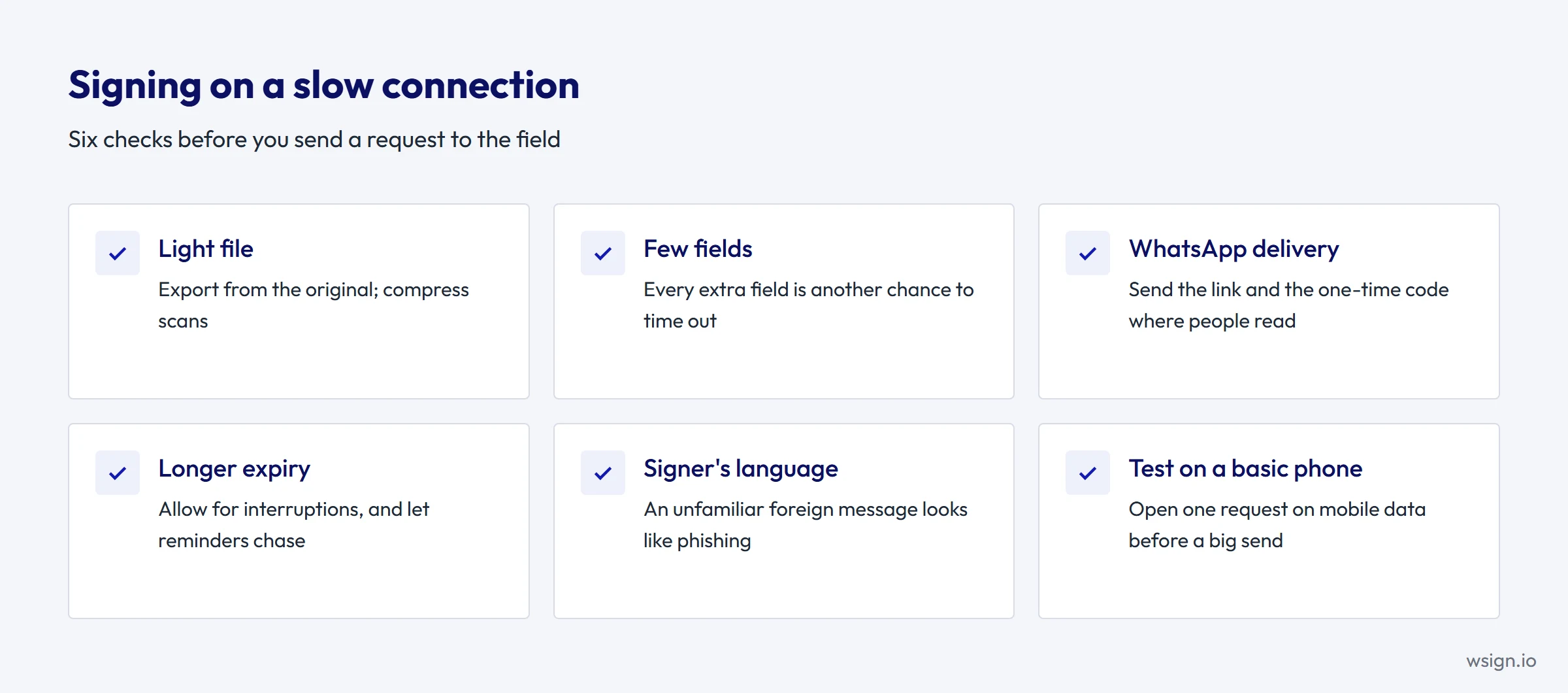
- Keep the file light. A forty-page photographed scan is heavy to load. Export from the original document, or compress scans before uploading.
- Ask for fewer fields. Every extra field is another chance for a page to time out halfway through.
- Use the channel people actually read. In many communities WhatsApp is checked more often than email, and the one-time code can arrive there too.
- Allow time. A longer expiry with reminders beats a short deadline that forces you to resend.
- Write the message in the signer's language. An unfamiliar request in a foreign language looks like phishing.
- Test before a big send. Open one request yourself on a basic phone using mobile data.
A simple rollout plan
- Start with one document type, usually volunteer agreements, because the volume is high and the risk is manageable.
- Write down the verification level for each document type in your inventory.
- Record who may sign for the organisation, and for what.
- Store evidence files with the programme or grant file they belong to.
- Review after the first cycle: which requests stalled, and why.
Frequently asked questions
Do nonprofits need a different kind of e-signature from companies?
No special category exists for nonprofits in most legal systems. What differs is the mix of documents and signers. Choose the verification level per document, as you would in any organisation.
Can a field partner sign on a phone with poor coverage?
Usually yes, if the file is light, the fields are few and the expiry is long enough to allow for interruptions. Test the request on a basic phone before sending it widely.
Should every volunteer go through identity verification?
Rarely. A one-time code is proportionate for most volunteer agreements. Reserve identity verification for roles involving vulnerable people, money or sensitive data, and follow your safeguarding policy.
What do we give a funder or auditor who asks for proof of signing?
The signed PDF, its evidence file and the verification number. Together they show who signed, how each signer was verified, when, and that the document has not changed since.
You can set up your first volunteer pack or grant agreement in a few minutes: create a wsign account and import the PDF you already use.
This article is general information, not legal advice.