When signing is part of your own product, such as an onboarding flow, a checkout or a customer portal, sending people to their inbox for a link breaks the journey. Embedded signing keeps them in place: the signing screen opens inside your page, or the user is sent to it and brought straight back. Either way, your application starts the signing and learns the outcome without the user leaving your experience.
The convenience comes with browser-security questions that ordinary email signing never raises. Which sites may display the signing page in a frame? How does your page learn that the signer finished, and how do you know that message is genuine? What stops another site from wrapping the signing screen in a deceptive layout?
This guide answers those questions with the relevant web standards: the W3C Content Security Policy frame-ancestors directive and the HTML postMessage API. Where it describes wsign's behaviour, it reflects how wsign's embedded signing page works today.
Iframe or redirect: pick the right container
There are two ways to embed signing, and they suit different screens.
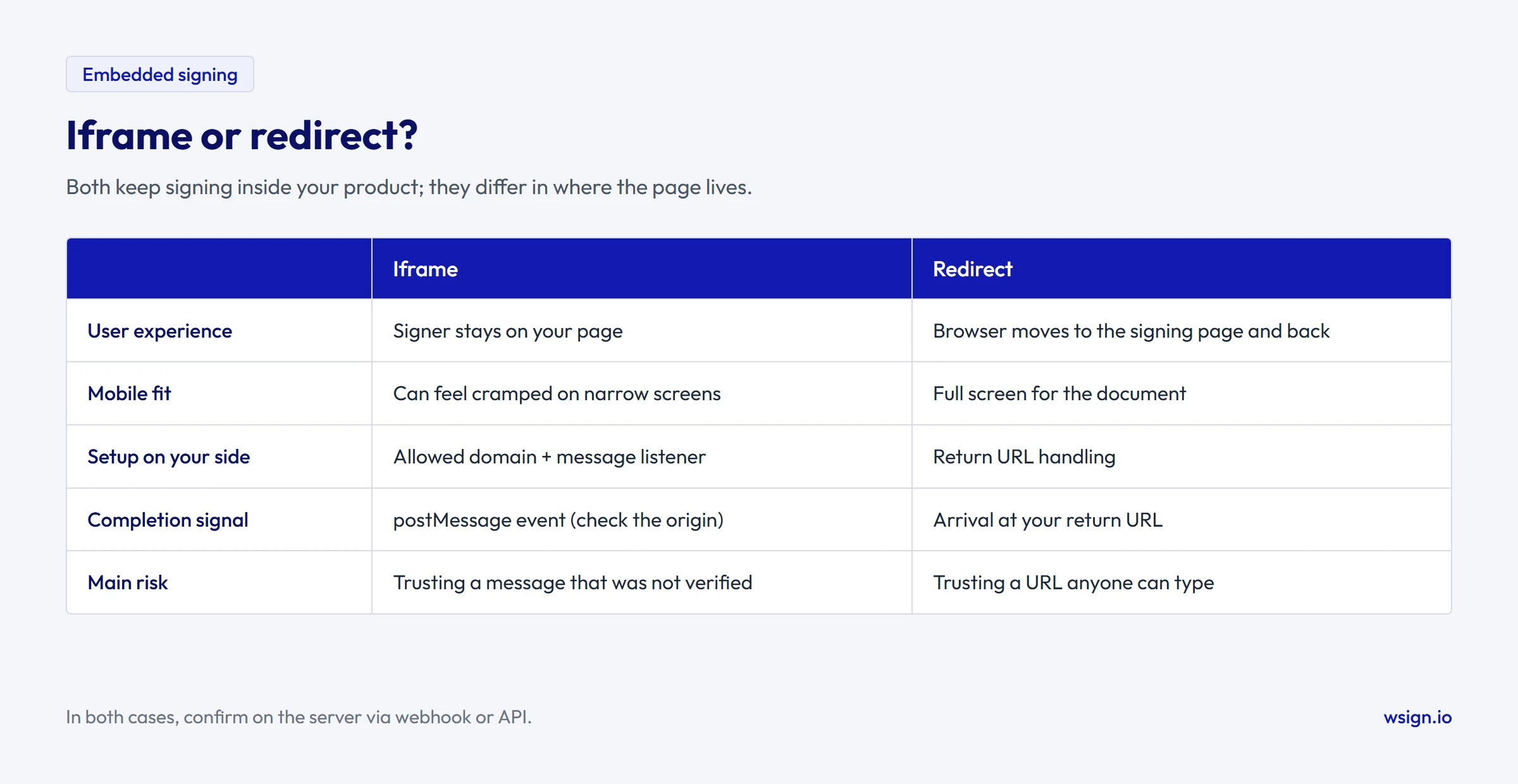
An iframe shows the signing page inside a frame on your page. The user never sees another address, and your page can react the moment signing ends. It needs a domain allowed to frame the page, and it works best on screens wide enough for the document.
A redirect sends the browser to the signing page and returns it to a URL you choose afterwards. It avoids framing rules entirely and gives the document the full screen, which is often the better choice on phones. The cost is a visible change of address and a return trip you must handle.
wsign supports both: an embedded signing session can be opened in a frame, or in redirect mode, where the browser goes to the signing page and comes back to your return URL.
How an embedded session should flow
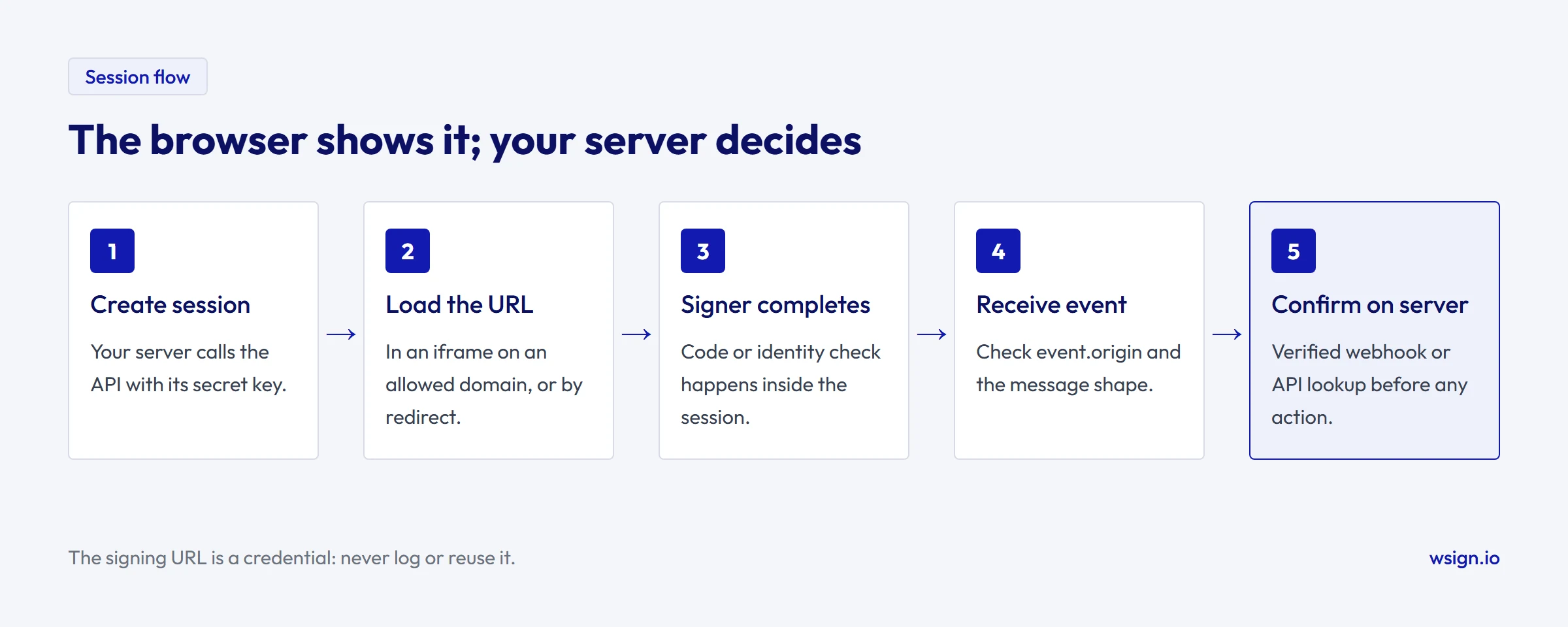
- Create the session on your server. Your backend calls the API with its secret key and receives a signing URL for one signer. The secret key never reaches the browser.
- Load the URL in your page. Put it in an iframe or redirect to it. Treat the URL as a credential: it lets whoever holds it sign as that person, so do not log it, cache it publicly or reuse it for another user.
- Let the signer finish. Authentication still applies inside the frame. If the sender requires a one-time code or identity verification, the signer completes it there; wsign's frame requests camera and microphone permission for that reason, so your iframe must not block them.
- React in the browser. Listen for the completion message, check where it came from, and update the screen.
- Confirm on the server. Before you release anything of value, confirm through a webhook or an API call that the request really reached the signed state.
Allowed domains and the frame-ancestors directive
A page that can be framed by any site can be framed by a malicious one. The defence lives on the signing page's side, in its HTTP response headers. The W3C Content Security Policy Level 3 specification defines frame-ancestors, a directive that restricts which URLs can embed the resource using frame, iframe, object or embed. The specification notes that it is similar to the older X-Frame-Options header, with 'none' roughly equivalent to that header's DENY, and that frame-ancestors is not supported when delivered through a meta element. It must be sent as a real response header.
For an embedding platform, this is how "allowed domains" are enforced. wsign does not let any site frame its signing page: when it serves an embedded session, it sets frame-ancestors to the origins approved for the account, so a browser refuses to render the page inside a frame on any other site. For you, that means two practical steps. Register the exact origins that will host the frame, including scheme and subdomain, such as https://app.example.com. And if a staging environment needs to embed too, register it separately rather than widening the list.
Listening for events with postMessage
A framed page cannot reach into your page's code, and you cannot read the frame's contents across origins. The two sides talk through window.postMessage, defined in the HTML Living Standard. wsign's embedded page posts messages to the parent window for viewed, signed, declined and error events. Each message carries a source of "wsign", a type such as "wsign:signed", and the signature request and signer identifiers.
The HTML standard's guidance on receiving messages is direct: authors should check the origin attribute so that messages are only accepted from expected domains, and even then should check that the data has the expected format. A safe listener therefore does three things:
- compares event.origin with the exact wsign origin and ignores anything else;
- checks the message shape: the expected source, a known type, identifiers that match the session you opened;
- treats the message as a user-interface signal only, never as proof of signature.
The last point matters because a message is easy to fake from any script running in your page, including a compromised third-party script. Use the event to move the screen forward, and rely on the signed webhook or an API lookup to change records, grant access or release goods.
The same standard warns about the sending side: when a message carries sensitive data, the sender should name the target origin rather than using "*", because a wildcard gives no guarantee about who receives it. If your page posts anything back into the frame, name the origin.
Return URLs in redirect mode
In redirect mode the signing page sends the browser to your return URL when it finishes. wsign can send the signer back to your return URL both after a completed signature and after a decline, and the same return URL is used when an iframe session finishes. Handle that page with the same caution as a postMessage event:
- Do not grant anything because a browser arrived at your "completed" URL. Anyone can type that address. Look up the request on your server first.
- Keep return URLs on your own domain, and never build them from user input, so the flow cannot be turned into an open redirect.
- Show a sensible page for slow confirmation, for example "We are confirming your signature", and update it when the webhook arrives.
Security pitfalls to avoid
Clickjacking
Clickjacking places a real page inside a frame and covers it with misleading content so the user clicks something they did not intend. frame-ancestors is the main defence, which is why allowed domains matter. On your own side, never overlay elements on top of the signing frame, never make it transparent, and never shrink it so that the document is unreadable.
Session links that live too long
A signing URL is a bearer credential. Create it just before you show it, open it for the signer it belongs to, and let it expire. wsign's embedded session reports an expired session as an error event rather than showing a stale document.
Scripts that see too much
Analytics, chat widgets and tag managers on the host page can observe messages and URLs. Keep the signing step on a page with as few third-party scripts as practical.
Frames that are too small
A cramped frame makes the document hard to read, and a signer who cannot read the document is a poor basis for consent. Give the frame generous height, and switch to redirect on narrow screens.
For the server side of the integration, see our guide to e-signature API integration and the developer security notes.
Frequently asked questions
Can I put the frame-ancestors rule in a meta tag on my page?
No. The rule belongs to the framed page, not the host, and the CSP specification does not support frame-ancestors in a meta element. The signing service sends it as a response header.
Is the postMessage "signed" event enough to mark a contract signed?
No. Use it to update the screen, then confirm with a verified webhook or an API call before changing any record.
Should I use an iframe on mobile?
It can work, but redirect usually gives a better reading and signing experience on small screens. Many products use an iframe on desktop and redirect on mobile.
Why does the frame show an error on our test site?
Most often the test site's origin is not on the allowed list, so the browser refuses to frame the page. Register that exact origin, including its scheme and subdomain.
wsign's API, webhooks and embedded signing are documented in the developer portal. Create an account to try an embedded session with a test key.