Once your application sends documents for signature through an API, it needs to know what happens next: who opened the link, who signed, who declined, and when the final file is ready. You can ask the signing service repeatedly, or you can let it tell you. Webhooks are the second option: the service sends an HTTP request to an address you control each time a relevant event occurs.
Webhooks are simple to switch on and surprisingly easy to get wrong. A handler that trusts unsigned requests can be fooled into marking a contract as signed. One that processes the same delivery twice can send two welcome emails or provision an account twice. One that assumes events arrive in order can overwrite a final state with an older one.
This guide covers the parts that matter in production: choosing events, verifying signatures with HMAC, answering quickly, handling retries and duplicates, coping with ordering, and deciding what to store. Where it describes wsign specifically, the details come from the wsign webhooks documentation.
Choose events by the action they trigger
Subscribe to the events your system will act on, not to everything. Each event you receive is code you must maintain. A useful way to decide is to write down, for each event, what your application does when it arrives.
| Event (wsign name) | Typical action in your system |
|---|---|
| signature_request.completed | Fetch the final document, mark the deal or hire as signed, start onboarding. |
| signer.signed | Update progress for a multi-party request; notify the next internal owner. |
| signer.viewed | Record engagement; useful for follow-up timing. |
| signer.declined | Alert the account owner and stop dependent steps. |
| signature_request.expired / canceled | Close the open task and release anything reserved for it. |
| document.sealed | The sealed evidence record exists; store its reference with your copy of the contract. |
The list of available events, including identity-verification events, is in the documentation. Request-level events suit most business logic; signer-level events are worth adding when you show progress to users or act on individual signers.
Anatomy of a delivery
A delivery is an HTTPS POST with a JSON body. In wsign the body carries an event identifier (prefixed evt_), the event type, a creation time and the affected object, such as the signature request with its signers. The request also carries a signature header, Wsign-Signature, in the form t=<unix time>,v1=<hex HMAC>. Everything your handler decides should start from that header.
Verify every request with HMAC
Your webhook URL is reachable from the internet, so anyone who learns it can send a request that looks like an event. The signature is how you tell a genuine delivery from a forged one.
HMAC, defined in RFC 2104, computes a keyed hash as H(K XOR opad, H(K XOR ipad, text)): the shared secret is mixed into two nested hash calculations, so only someone holding the secret can produce a matching value. The RFC recommends a key at least as long as the hash output and notes that shorter keys reduce security. wsign uses HMAC-SHA256 with an endpoint secret that begins with whsec_, computed over the string "{t}.{raw_body}".
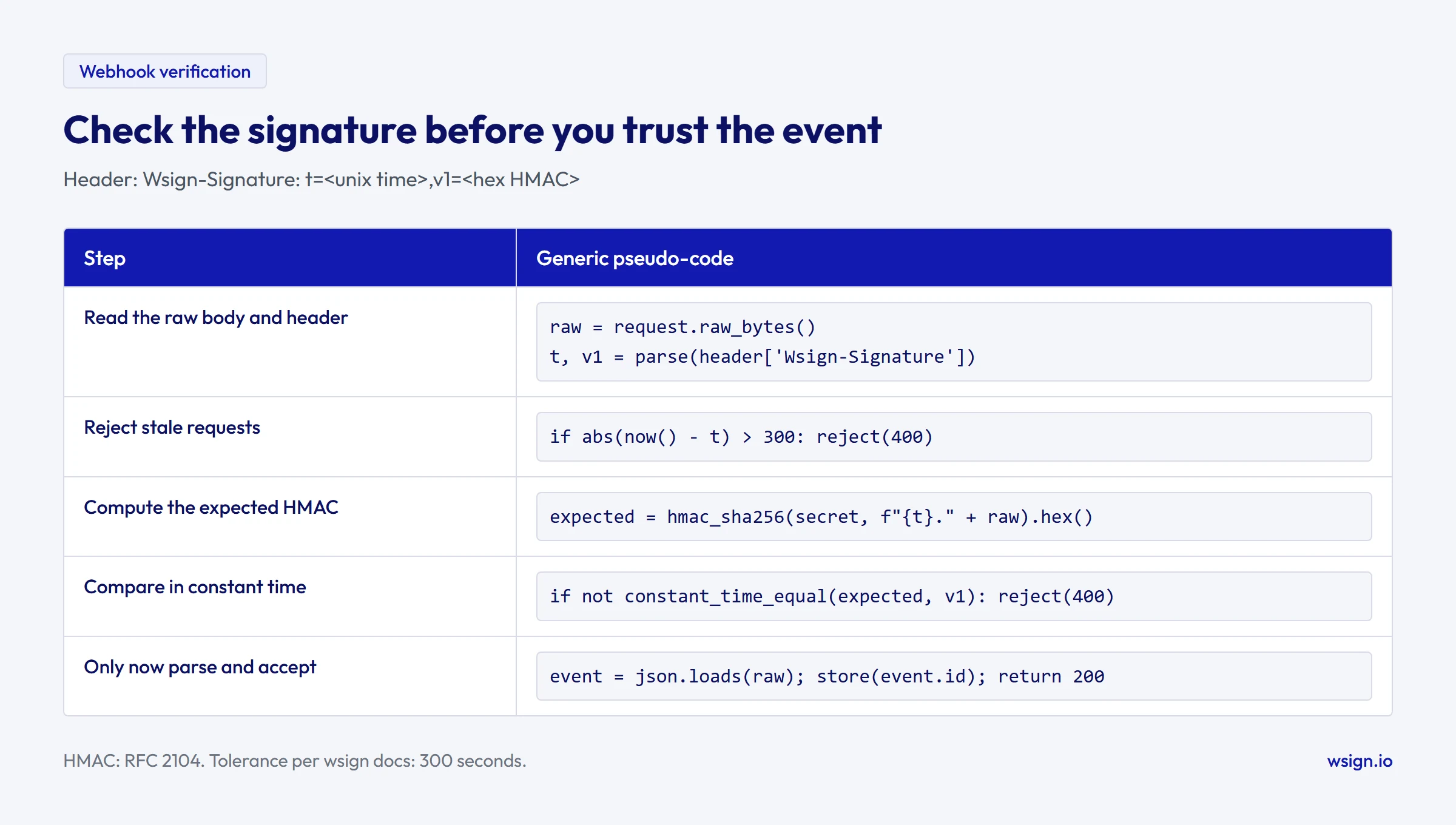
Four details decide whether verification actually protects you:
- Use the raw body. Compute the HMAC over the bytes exactly as received. If a framework parses JSON first and you re-serialise it, spacing or key order can change and a genuine request will fail.
- Check the timestamp. The signed t lets you reject old requests. wsign's documentation suggests rejecting anything more than 300 seconds from your server's clock, which limits replay of a captured request. Keep your server clock synchronised.
- Compare in constant time. Use a constant-time function such as hmac.compare_digest, crypto.timingSafeEqual or hash_equals, so the comparison does not leak how many characters matched.
- Protect the secret. Keep it in a secrets store, not in code. If it may have leaked, rotate it.
Answer fast, then do the work
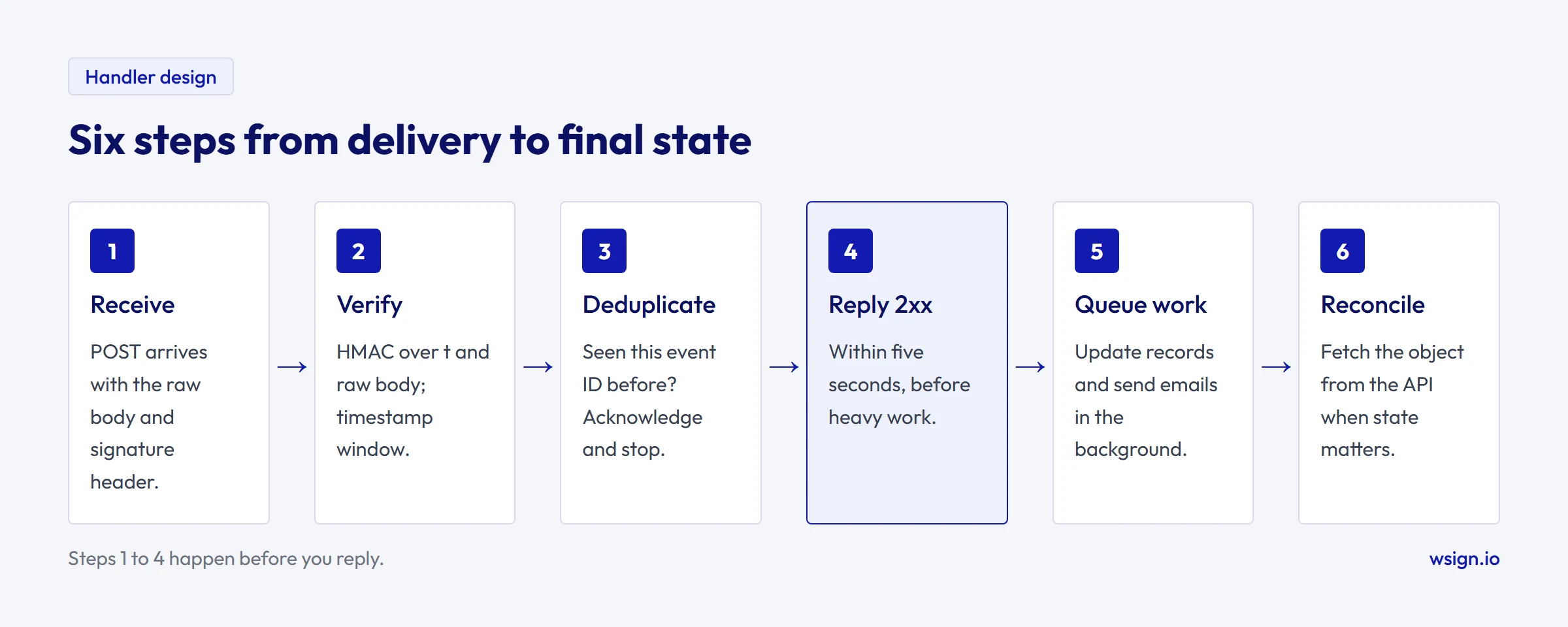
The sender waits for your reply, and a slow reply looks like a failure. wsign recommends responding within five seconds. The reliable pattern is to verify, record the event, return a 2xx status, and hand the real work, such as database updates, emails and file generation, to a queue or background job. Long synchronous processing is the most common cause of avoidable retries.
Expect duplicates and make the handler idempotent
Retries are a feature. If your endpoint is down or answers with an error, the sender tries again. wsign retries with exponential backoff over a window of about 46 hours before marking a delivery as failed after nine attempts. The consequence is that the same event can reach you more than once, for example when your server processed it but the reply was lost.
The cure is idempotency. Store each event identifier as you accept it, with a unique constraint, and ignore any identifier you have already processed. The effect of a delivery should be the same whether it arrives once or five times. Make downstream actions idempotent too: "set status to signed" is safe to repeat, while "send welcome email" needs its own guard.
Do not rely on arrival order
Events can arrive in a different order from the one in which they happened, especially after a retry. A late signer.viewed must not move a request back from completed to in progress. Two habits prevent this:
- Treat states as moving forward only, and ignore an event that would move a record backwards.
- When you need the authoritative state, fetch the object from the API rather than trusting the payload alone. The event tells you something changed; the API tells you what is true now.
Decide what to store
A small event log pays for itself the first time something goes wrong. For each delivery, keep:
- the event identifier, type and creation time;
- when you received it and whether signature verification passed;
- the processing status and any error;
- the object identifiers you acted on, such as the signature request and signer IDs.
Be careful with the full payload. It contains signers' names, email addresses and possibly phone numbers, so either keep it for a short, defined period or store only the fields you need. Never log the endpoint secret or the signature header next to the secret.
Test before going live, and plan for catch-up
Build against a test key so events are marked as test mode and nothing is charged or sent to real people. Register your endpoint with that key, create a request to your own email address, sign it, and watch the events arrive. The quickstart walks through the first request.
Plan for outages as well. If your endpoint was down longer than the retry window, list past events through the API and process any you missed, and use redelivery for a specific event when you need to replay it. Combined with idempotency, catch-up is safe to run whenever you are unsure.
For the wider integration, including authentication and request design, see our guide to e-signature API integration; if you also show the signing screen inside your app, the embedded signing guide covers the browser side.
Frequently asked questions
Can I skip signature verification if my URL is secret?
No. URLs leak through logs, proxies and screenshots. Verification is the only check that a request came from the signing service and was not altered.
Why does verification fail for genuine requests?
Almost always because the HMAC was computed over a parsed and re-serialised body instead of the raw bytes, or because the server clock has drifted outside the timestamp window.
Should I return an error if processing fails later?
If you have already accepted and queued the event, return 2xx and handle the failure in your own retry logic. Return an error only when you could not accept the event at all, so the sender retries.
Do I still need polling?
Not routinely. A scheduled reconciliation that fetches recent events or objects is a useful safety net, but webhooks should carry the normal flow.
The wsign API, webhooks and SDKs are documented in the developer portal. Create an account to start building with a test key.