A message saying "You have a document waiting for your signature" is one of the most ordinary emails in business. It names a sender, mentions a contract, and offers one big button. That ordinariness is exactly why criminals copy it. People expect these messages, they often arrive with a deadline, and clicking the button feels like part of the job.
A fake signing request usually wants one of three things: your email or company login, a payment you would not otherwise make, or a chance to run something on your device. The good news is that a genuine signing request never needs any of those, which gives you a clear test.
This guide is in two halves. The first is for recipients: the warning signs and a safe way to check a request without trusting its links. The second is for senders: what to do so that your real requests do not look like the fake ones.
Why signing requests are a favourite disguise
The UK National Cyber Security Centre lists the levers scam messages pull: authority, urgency, emotion, scarcity and current events. A signature request can carry most of these at once. It can claim to come from a lawyer, a bank, a landlord or a finance director (authority). It can say the offer expires today (urgency). It can hint at a payment, a bonus or a penalty (emotion). And it can arrive at the end of a quarter or during a tax season, when people really are signing more documents (current events).
The US Cybersecurity and Infrastructure Security Agency adds that perfect grammar and spelling no longer rule out phishing, because generative tools produce clean text. The old advice to look for clumsy wording is no longer enough on its own.
Red flags in a signature request
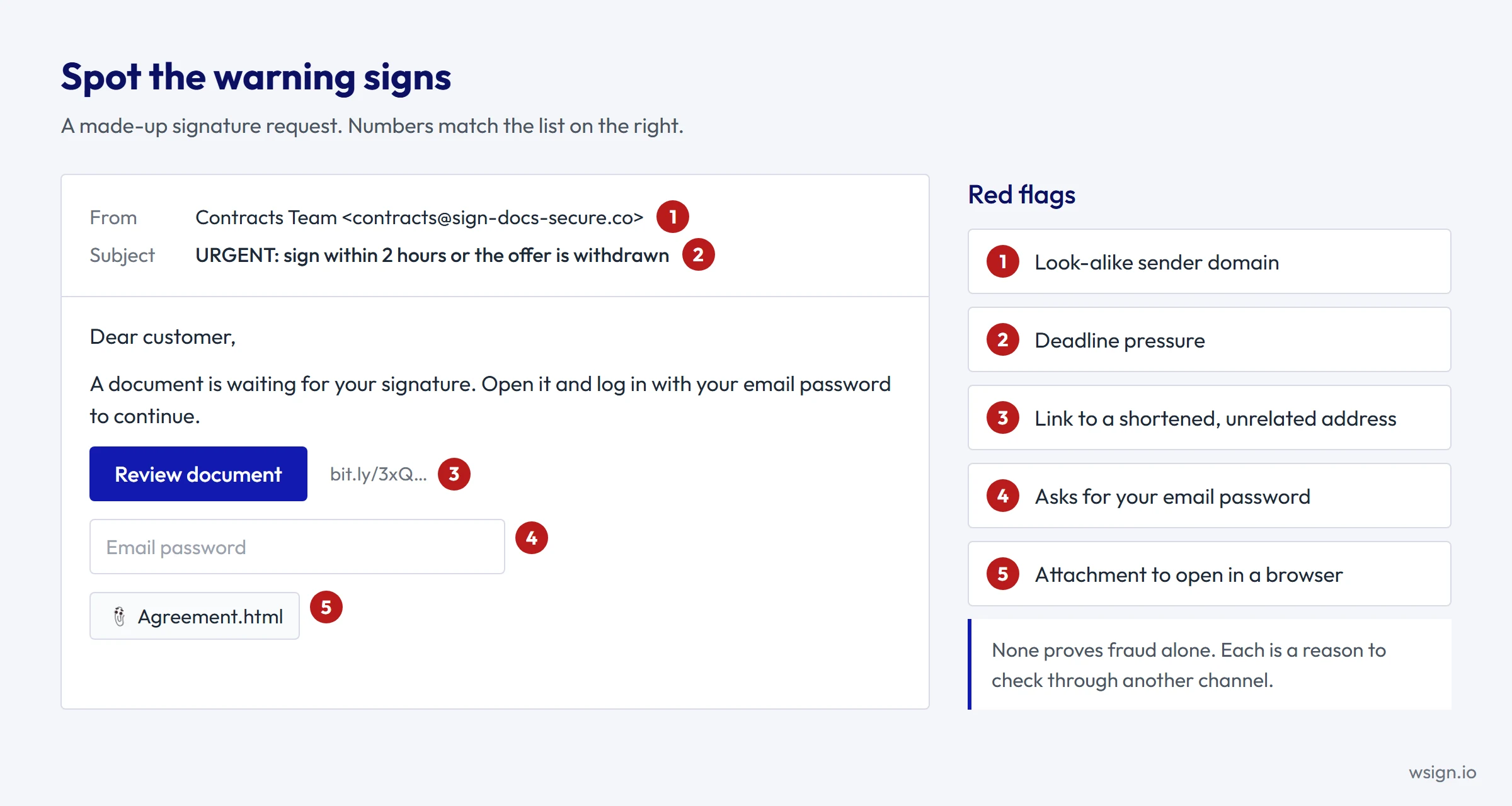
| What you see | Why it matters | What to check |
|---|---|---|
| A document you were not expecting, from someone you have not dealt with | Genuine requests usually follow a conversation, an offer or a meeting | Ask yourself what agreement this could be. If nothing comes to mind, treat it as suspect |
| Sender address slightly different from the real one, or a reply-to address on another domain | CISA lists incorrect email addresses and look-alike spellings as a classic sign | Read the full address, not only the display name |
| A button whose link goes to an unrelated or shortened address | Untrusted shortened URLs and mismatched links are common in phishing | Hover over the link on a computer, or press and hold on a phone, to read the real destination |
| The page asks for your email or office password before showing the document | A signing page has no reason to know your mailbox password | Close the page. This is the single most reliable sign of a credential trap |
| An attachment that must be "enabled", unzipped or opened in a browser | Signing happens on the provider's page, not inside an attached file | Do not open it. Ask the sender through a known channel |
| Pressure: "sign within 2 hours or the offer is withdrawn", or a threatened penalty | Urgency is one of the levers the NCSC highlights | A real counterparty will usually accept a short delay while you check |
| A request to change bank details, pay a fee to "release" the document, or confirm card data | Signing a document does not require paying the person who sent it through the signing page | Confirm any payment instruction by phone, using a number you already hold |
How to check a request safely
The principle comes straight from CISA's guidance: if a message might be real, do not use its links or the phone numbers inside it. Reach the organisation or person another way, by typing the website address yourself or calling a number you already know. In practice:
- Pause before clicking. Read the sender address, the document name and the deadline. Ask whether you expected this.
- Contact the sender independently. Use a phone number from your own records or an earlier thread you started, not the signature block of the suspicious email. Ask: "Did you just send me a document called X?"
- Go to the service directly. If you hold an account with the signing provider, type its address into the browser and look for the request in your account instead of following the email.
- Check the link domain if you do open it. The address bar should show the provider's real domain. A sub-path on a free hosting site, or a long random domain, is a reason to close the tab.
- Notice what the page asks for. A legitimate signing page may send a one-time code to your email or phone, show you the document, and ask for your name. It should never ask for your mailbox password.
- Verify completed documents through the public check. If someone sends you a "signed copy" and you want to know whether it is genuine, use the provider's verification page with the verification number shown on the document. Our guide on verifying a signed document walks through that check, and for wsign documents the page is wsign.io/verify.
If you already clicked
Do not wait to see whether anything happens. Change the password you typed, and change it anywhere else you reused it. Turn on two-step verification if it is available. Tell your IT or security contact so they can look for other messages in the same campaign. Then report the message: CISA points to the "report phishing" option in your mail client, and in the UK the NCSC runs a scam email reporting service that it uses to investigate and take down scam addresses and websites.
For senders: making real requests easy to trust
If your customers, employees or suppliers learn to distrust signing emails, your legitimate requests will be ignored too. A few habits make the real thing clearly different from the imitation.
- Announce documents through a second channel. Mention in the meeting, call or chat that the agreement is coming, with its name. A request that matches what someone was told is easy to trust.
- Keep the naming predictable. Use the same sender name, your organisation's name, and a document title the recipient recognises. Avoid vague titles such as "Document.pdf".
- Never put payment changes in a signing request. If bank details change, say so separately and invite the recipient to confirm by phone.
- Protect your email domain. The NCSC recommends SPF, DKIM and DMARC to make it hard for criminals to send email that appears to come from your organisation, and advises protecting every domain you own, including those used with cloud email providers.
- Raise authentication for higher-risk documents. A one-time code proves the signer controls an inbox or phone. For documents where a wrong signer would be costly, add identity verification or a certificate token. Our signer authentication levels guide explains how to choose.
- Give recipients a way to check. Tell them where the verification page is and that a signed copy carries a verification number they can look up.
In wsign, requests can go by email or WhatsApp, the signer confirms a one-time code before signing, and you can require identity verification through an external specialised provider for sensitive agreements. Account holders can protect their own login with two-step verification through an authenticator app, which limits the damage if a password is ever phished. The trust centre describes these controls.
Frequently asked questions
The email uses the right company logo. Does that make it genuine?
No. Logos and layouts are easy to copy. Judge the sender address, the real link destination, and above all what the page asks you to enter.
Is it safe to sign on my phone?
Yes, if you reached the page safely. Phones hide link destinations more than computers do, so press and hold the button to preview the address, or open the request from your account instead.
I received a one-time code I did not request. What does that mean?
It may mean someone typed your address or number into a sign-in or signing page. Do not share the code with anyone who contacts you about it. If it relates to an account you hold, change that password and check its active sessions.
Can I report a fake request that imitates a signing provider?
Yes. Use your mail client's phishing report option, report it to your national cyber security body where one exists, and forward it to the genuine provider's security or support contact, which you should find by visiting its website directly.
If you send agreements regularly, you can set up a wsign account and decide, document by document, how each signer should confirm who they are.