Every organisation eventually needs the same thing from a large group of people: confirmation that they have received and read a policy. It might be a code of conduct for all staff, an updated information security policy, a health and safety procedure for contractors or a data protection notice for volunteers. The document is the same for everyone; what differs is who has acknowledged it, when, and which version.
Done by email and spreadsheet, this turns into weeks of chasing and an incomplete record. Done as a structured bulk-signing campaign, it becomes a process you can run, track and repeat each time the policy changes. This article walks through that process from preparing the policy to handling the next revision.
Acknowledgement is not the same as agreement
Be clear about what you are collecting, because it shapes the wording and the evidence.
- An acknowledgement records that a person received a document and had the opportunity to read it, for example "I confirm that I have received and read the Code of Conduct, version 4."
- An agreement creates or changes obligations, such as a new clause in an employment contract.
Mixing the two in one request causes trouble. If a policy update also changes contractual terms, treat that part as a separate contract change, reviewed by your legal and human resources advisers, rather than hiding it inside a routine acknowledgement. Whether a policy can bind employees at all depends on local employment law, so take local advice where that matters.
Step 1: Prepare the policy for acknowledgement
A policy that is easy to acknowledge is one that is easy to identify later.
- Version and date on every page: put the version number and effective date in the footer, not only on the cover.
- A one-page summary at the front: list what the policy covers and, for revisions, what changed. People are more likely to read a short summary than forty pages.
- A clear acknowledgement statement: one sentence naming the document and its version, placed where the signer confirms.
- Minimal fields: usually a signature and a date. If you need an employee number, prefill it rather than asking each person to type it.
Step 2: Build a clean recipient list
The quality of your campaign depends on the list. Export it from the system of record, such as your human resources system or contractor register, rather than copying addresses from an old email thread.
- Remove leavers and duplicates; check that each person has one current contact address.
- Decide how to reach people without a company email address. A one-time code or link by WhatsApp to a verified mobile number may be more practical for field staff or volunteers.
- Add the fields you will need for follow-up: department, manager and location. They make tracking and escalation much easier.
- Decide in advance how you treat people on long leave; give them a later deadline rather than letting them appear as non-compliant.
Step 3: Send one request per person
Bulk sending should create an individual request for each recipient, not one document with hundreds of signers. Individual requests mean each person signs only their own copy, sees nothing about colleagues, and produces their own evidence file. If one person's request expires or bounces, nobody else is affected.
Keep the invitation message short and specific: what the document is, why it matters, the deadline, and who to contact with questions. Messages that look generic are easy to ignore and may be mistaken for phishing; our sibling article on spotting fake signature request emails explains what makes a request look trustworthy.
For most acknowledgements, an email link or a one-time verification code is enough. Reserve identity verification for documents where impersonation would matter, for example access to regulated systems. The signer authentication levels article helps you choose.
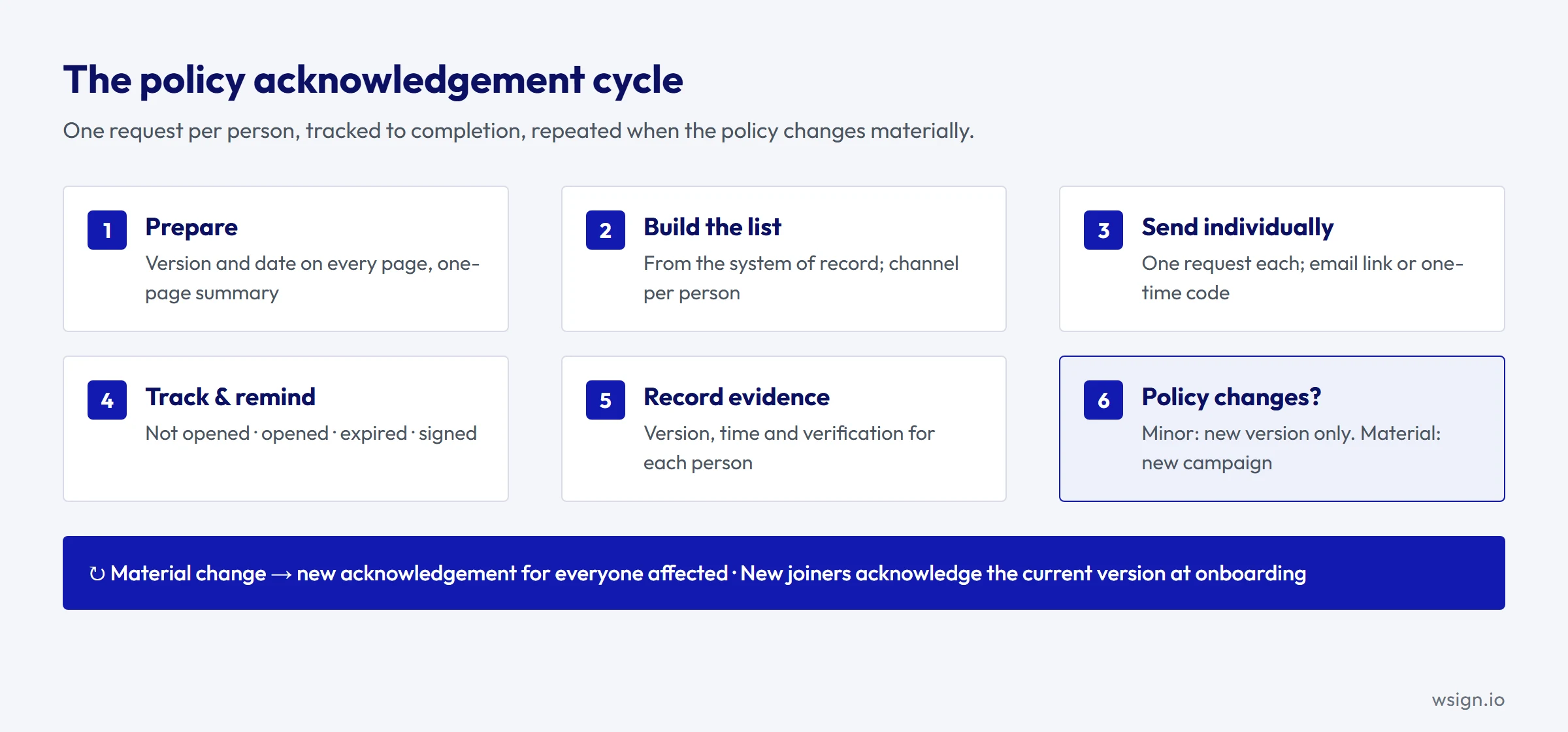
Step 4: Track and remind
Once requests go out, the work shifts to tracking. A dashboard view should show, at a glance, how many people have signed, how many have opened but not signed, and how many have not opened at all. Each group needs a different response.
| Status | Likely reason | Response |
|---|---|---|
| Not opened | Message missed, wrong address, filtered as spam | Check the address; send a reminder through a second channel |
| Opened, not signed | Busy, unsure what is required, technical issue | A reminder that repeats the deadline and a contact for questions |
| Expired | Deadline passed during leave or travel | Resend with a new deadline |
| Signed | Done | No further messages |
Automate reminders on a predictable rhythm, for example three days after sending and again two days before the deadline. After the deadline, a list grouped by manager lets each manager follow up with their own team, which is usually more effective than another automated message.
Step 5: Keep the evidence where you can find it
For each person you should be able to show which version they acknowledged, when, and how they were verified. An audit trail and an evidence file for each signed acknowledgement give you that record without a separate spreadsheet. Decide how long you keep these records; our sibling article on retention schedules for signed documents covers how to set that period and delete on time.
Step 6: Re-acknowledgement when the policy changes
Policies change, and the question is always whether everyone must acknowledge again. A simple rule helps:
- Minor change (typo, formatting, a new contact name): update the version number, publish it, and do not ask for new acknowledgements.
- Material change (new obligations, new prohibited conduct, changed reporting routes): send a new acknowledgement request for the new version to everyone affected.
When you re-send, put a short "what changed" section at the top so people can see the difference without rereading the whole policy. Keep the older acknowledgements: they show what each person had confirmed at the time, which matters if a question later concerns events before the update.
New joiners between campaigns
People who join after a campaign should acknowledge the current version as part of onboarding, not wait for the next annual round. Add the request to your onboarding steps so the record stays complete. The human resources solutions page describes how onboarding documents fit into a signing flow.
A worked example
Imagine a logistics company with office staff, drivers and warehouse contractors that updates its health and safety policy. The compliance lead prepares version 5 with a one-page summary of three new rules. She exports the list from the human resources system, adds contractors from the site register, and chooses email for office staff and WhatsApp for drivers who rarely check email.
Individual requests go out with a two-week deadline. After the first reminder, the dashboard shows most office staff have signed but many drivers have opened without signing. She learns that the PDF is hard to read on small screens, adds a mobile-friendly summary, and sends a second reminder. Remaining names are grouped by depot manager for in-person follow-up. When a minor correction follows a month later, she publishes version 5.1 without a new campaign, because nothing in it changes what people must do.
Frequently asked questions
Should all employees sign the same document together?
No. Send an individual request to each person. It keeps personal data private, gives each person a separate evidence record and stops one problem from blocking everyone.
How often should we ask people to re-acknowledge a policy?
Whenever the policy changes materially, and at any regular interval your own rules or regulators require. Minor edits do not usually need a new round.
What if someone refuses to acknowledge?
Record the refusal and escalate it through the normal management route. Do not mark them as acknowledged, and take advice on the employment implications.
Is a one-time code necessary for a simple acknowledgement?
Not always. For internal staff using company email, an email link may be enough. A code adds assurance where accounts are shared or messages go to personal numbers.
To run your next policy campaign with bulk sending, reminders and an evidence file for every person, you can create a wsign account.