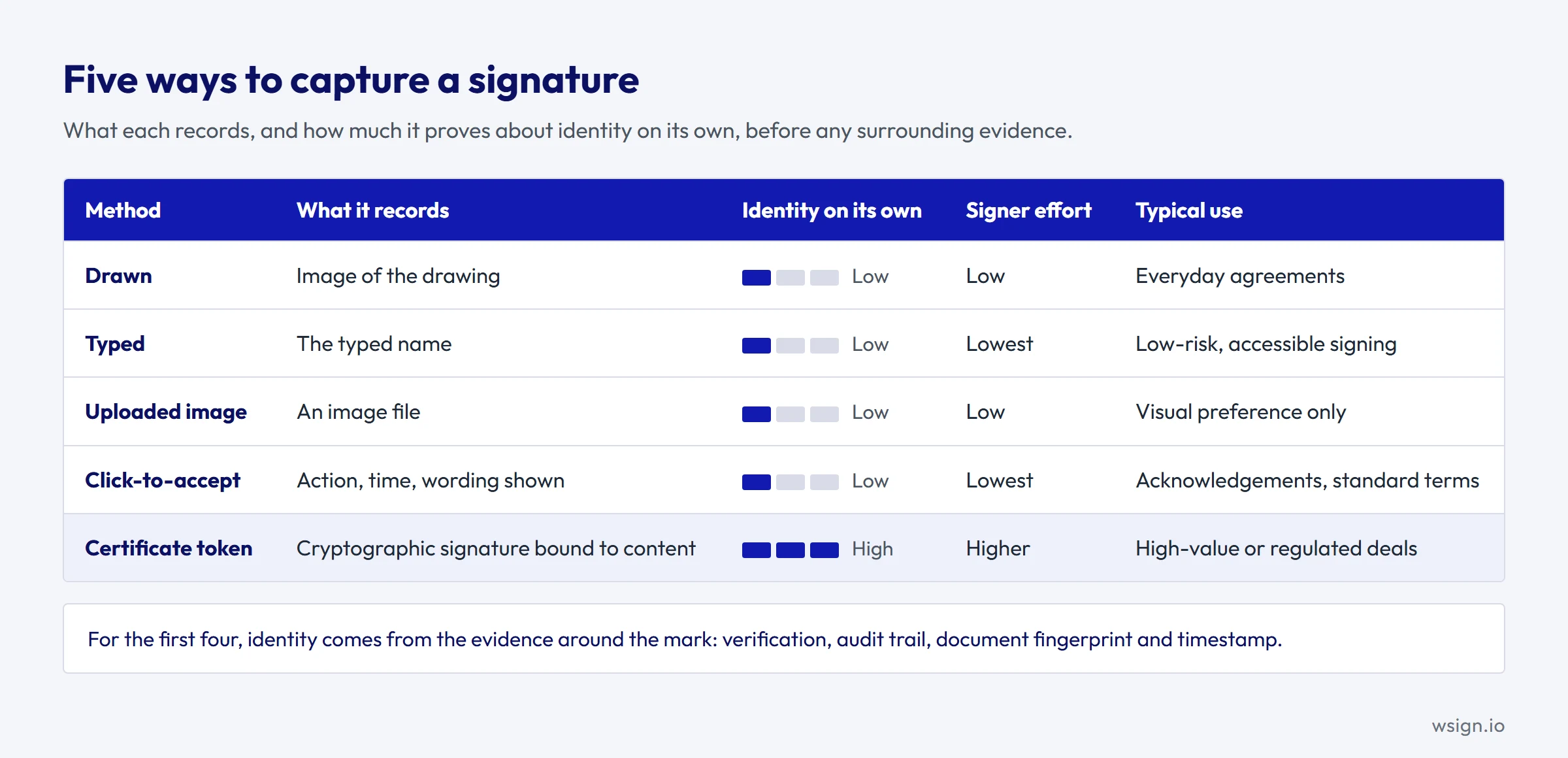
When people picture an electronic signature, they usually picture a hand-drawn squiggle on a screen. In practice, signing services offer several ways to capture a signature: drawing it, typing a name, uploading an image, clicking a button to accept, or signing with a certificate held on a token. They look different on the page, but the more important difference is what each one actually records and what evidence surrounds it.
This article compares the five common capture methods, explains what each proves on its own and what it does not, and offers a way to choose between them. The short version: the visible mark is rarely the strongest part of the evidence. What happens around it, such as who was verified, when, and whether the document changed afterwards, usually matters more.
What the law looks for, in general terms
Many electronic signature laws define a signature by its function rather than its appearance. In the European Union, eIDAS defines an electronic signature as data in electronic form attached to or logically associated with other electronic data and used by the signatory to sign (Regulation (EU) No 910/2014, Article 3(10)). The same regulation says an electronic signature shall not be denied legal effect and admissibility as evidence solely because it is electronic or does not meet the requirements for qualified signatures (Article 25(1)).
In the United States, the ESIGN Act defines an electronic signature as an electronic sound, symbol or process attached to or logically associated with a record and executed or adopted by a person with the intent to sign it (15 U.S.C. § 7006(5)).
Two ideas recur in both definitions: an association between the signature and the document, and the signer's intent to sign. None of the capture methods below proves those things alone; the process around the mark is what makes them demonstrable. Rules also differ by country and by type of document, so check local requirements for anything unusual; our sibling article on documents excluded from e-signature covers common exceptions.
The five capture methods
1. Drawn signature
The signer draws with a finger, stylus or mouse. It feels familiar and produces a mark that resembles a wet-ink signature, which many signers and recipients find reassuring.
- What it captures: an image of the drawing, and sometimes timing data of the strokes depending on the service.
- Limits: a drawn mark on a screen looks different from the person's paper signature and from their own previous drawings. Visual comparison is a weak way to identify a signer.
- Good for: everyday agreements where the familiar look helps signers feel comfortable.
2. Typed signature
The signer types their name and the service renders it, often in a script-style font.
- What it captures: the typed name.
- Limits: anyone can type any name, so the typed text adds little to identity. Its value comes entirely from the surrounding verification and records.
- Good for: accessibility, since it does not need fine motor control; also quick for low-risk documents.
3. Uploaded signature image
The signer uploads a scan or photo of their paper signature.
- What it captures: an image file.
- Limits: an image can be copied and reused by anyone who obtains it, so it says nothing about who placed it on this particular document. Treat it as a visual preference, not as evidence.
- Good for: signers who want their documents to show their usual signature, provided strong verification sits behind it.
4. Click-to-accept
The signer ticks a box or presses a button such as "I agree", with no visible signature mark.
- What it captures: the action and its time, plus the exact wording the signer saw next to the button.
- Limits: the evidence depends heavily on showing that the person saw the terms and that the wording made the consequence clear.
- Good for: acknowledgements and standard terms, such as our sibling article on collecting policy acknowledgements describes.
5. Certificate token signature
The signer uses a cryptographic key on a physical token, with an X.509 certificate issued by a licensed certification provider. The signing software computes a digital signature over the document's fingerprint using that key.
- What it captures: a cryptographic signature that can be checked against the certificate, binding the signer's certificate to the exact document content.
- Limits: the signer needs a token and its PIN, and the certificate must be valid at the time of signing. How certificates and their revocation work is covered in our sibling article on certificate chains and revocation.
- Good for: high-value or regulated transactions where a strong link between a specific person and the document is needed.
The evidence around the mark
Because four of the five methods say little about identity by themselves, a signing service has to record what happens around them. Look for these layers:
| Evidence layer | What it shows |
|---|---|
| Signer verification | How the person was linked to the request: email link, one-time code by email or WhatsApp, identity verification, or certificate |
| Audit trail | Each event with its time: sent, opened, viewed, verified, signed |
| Consent wording | The exact statement the signer agreed to when signing |
| Document fingerprint | A SHA-256 hash that changes if the document changes after signing |
| Trusted timestamp | Independent evidence of when the signed document existed |
| Evidence file | All of the above gathered for the signed document, with a verification number |
A drawn signature with a verified one-time code, a complete audit trail and a fingerprinted document usually tells a more convincing story than a beautiful signature image with nothing behind it. For more on fingerprints and timestamps, see document hashes and integrity.
How to choose a capture method
Start with the document's risk, then think about the signer.
- Decide the verification level first. The capture method matters less than how you confirm who is signing. Our sibling article on signer authentication levels gives a decision matrix.
- If a specific person must be strongly bound to the content, and the signer has or can obtain a token, use certificate token signing.
- For everyday agreements, let signers draw or type, whichever they prefer. Offering both helps signers on phones and those who cannot draw easily.
- For acknowledgements and standard terms, click-to-accept with clear wording is often sufficient and is the fastest for signers.
- Allow uploaded images only as a visual choice, never as a substitute for verification.
A company seal is a separate question
Some organisations also apply a company seal alongside a personal signature. A seal represents the organisation rather than an individual, and it should be protected so that it cannot be altered once used. If your business uses one, see the digital seal page for how it fits with personal signatures in wsign.
A worked example
Imagine a small consultancy that sends three kinds of documents. Engagement letters for new clients go out with a drawn or typed signature and a one-time code by email. The annual staff handbook acknowledgement uses click-to-accept, with a sentence naming the handbook version. A shareholder agreement between the founders and a new investor, where each party wants the strongest possible link between person and document, is signed with certificate tokens. In each case, the evidence file records verification, events and the document fingerprint, so the choice of mark matches the risk without making simple documents harder to sign.
Frequently asked questions
Is a drawn signature more valid than a typed one?
Not inherently. Many laws focus on intent and association with the document rather than the form of the mark. The strength comes mostly from verification and records, though requirements vary by country and document type.
Can I reuse a scanned image of my signature?
You can, as a visual preference. But an image can be copied, so it does not prove you placed it on a given document; the surrounding verification does that.
When is a certificate token worth the extra effort?
When the value or regulatory sensitivity of the document justifies a strong cryptographic link between a specific person and the exact content, and the signer has a token.
Does click-to-accept count as a signature?
It can, depending on the law that applies and how the acceptance was recorded. Clear wording next to the button and a reliable record of the action are essential.
To send documents with the verification level you choose, optional token signing and an evidence file for every document, you can create a wsign account.
This article is general information, not legal advice.